

Microsoft Office is the backbone of productivity in most organizations, from generating reports in Excel to managing communications in Outlook. Yet many companies aren’t fully using its potential, missing opportunities to automate repetitive tasks, streamline work sequences, and gain deeper insights.
This is where custom Microsoft Office add-ins come in. A custom add-in extends the capabilities of Office applications, allowing businesses to automate manual processes, integrate Office with internal systems, reduce errors, and improve compliance.
In this guide, we’ll explain what Office add-ins are, why they matter, and how to arrange Microsoft Office add-ins development in 2026 to achieve better business outcomes.
What Is a Microsoft Office Add-in?
A Microsoft Office add-in is a small application that extends the functionality of Office applications. Unlike standalone software, add-ins work directly inside tools the team already uses, such as Microsoft Excel, Microsoft Word, Microsoft Outlook, or Microsoft PowerPoint.
With an Office add-in, tasks that used to take hours, such as consolidating reports, cross-checking data, or creating standardized documents, can now be completed in minutes, with minimal effort and fewer errors.
What Are the Benefits of Office Add-ins?
By adding new features to Office apps, add-ins help with task automation, workflow efficiency, and system integration.
Just take as an example the case when a finance department spends much time every week consolidating Excel reports from different departments. An Excel add-in can automatically collect data from various external sources, reformat it, and produce actual dashboards within a few minutes.
In the same way, in sales and marketing, a PowerPoint add-in can auto-generate client proposals with pre-approved templates and real-time product pricing pulled from your CRM, thus greatly reducing the time for preparation.
An Outlook add-in, likewise, can keep track of emails and automatically log communications into the CRM, thereby eliminating the risk of losing leads or missing follow-ups.
Apart from saving time, add-ins also facilitate compliance and standardization. For example, the legal department can equip its Word with add-ins to generate contracts or NDAs using the words and formatting approved by the company, thus minimizing the legal risks and errors.
Off-the-Shelf vs. Custom Office Add-ins: What’s the Difference?
When a business decides to extend Microsoft Office, generally there are two main options to consider: buying off-the-shelf add-ins or developing custom solutions. Knowing what separates the two is a crucial step in deciding where to put your money.
Off-the-Shelf Add-ins
Off-the-shelf add-ins are pre-built solutions made to manage common industry needs. They are ready to install from the Microsoft AppSource marketplace and often cover standard tasks, such as email tracking, generic reporting templates, or simple automation.
Pros:
- Quick to deploy
- Often lower initial cost
- Suitable for general use cases
Cons:
- Limited customization, i.e., cannot fully match unusual workflows
- May require a team to adapt existing processes to fit the software
- Integration with internal systems is often limited or impossible
- Features may include unnecessary options
Custom Add-ins
Custom Office add-ins are created specifically for unique business needs. A development partner builds solutions that integrate with any internal systems, automate unique processes, and provide features that off-the-shelf solutions simply cannot match.
Pros:
- Fully adjusted to workflows and business rules
- Integrates directly with internal systems
- Automates repetitive, time-consuming tasks
- Fully coordinated with security policies and compliance requirements
- Scalable and future-proof
Why Build Office Add-ins with JavaScript in 2026
When considering custom Office add-ins, choosing the right technology is just as important as defining the workflow. In 2026, JavaScript has already become the standard for building modern, flexible, and future-ready Office add-ins, and for good reason.

1. Cross-Platform Compatibility
JavaScript-based add-ins work across Windows, Mac, and Office Web apps. This means employees can access the same functionality whether they’re in the office, at home, or on a mobile device, without compromising performance or security.
2. Integration with Business Systems
JavaScript enables add-ins to connect with lots of internal systems, such as CRM, ERP, databases, and cloud services. This integration allows data to automatically flow between Office tools and business applications.
3. Fast Development and Agile Updates
JavaScript allows developers to quickly build, test, and update add-ins. Modern development frameworks, libraries, and tools make it easier to implement new features, correct defects, and deploy improvements without interrupting users.
4. Future-Adapted and Scalable
JavaScript add-ins are compatible with all modern technologies like cloud computing, AI, automation, and Microsoft Graph, making them adaptable for future business demands.
5. Better User Experience
Because JavaScript allows for rich, interactive web-based interfaces, add-ins can deliver user-friendly experiences that feel native to Office software. Employees can interact with data visually, trigger workflows, and receive real-time feedback, all within the familiar Office setting.
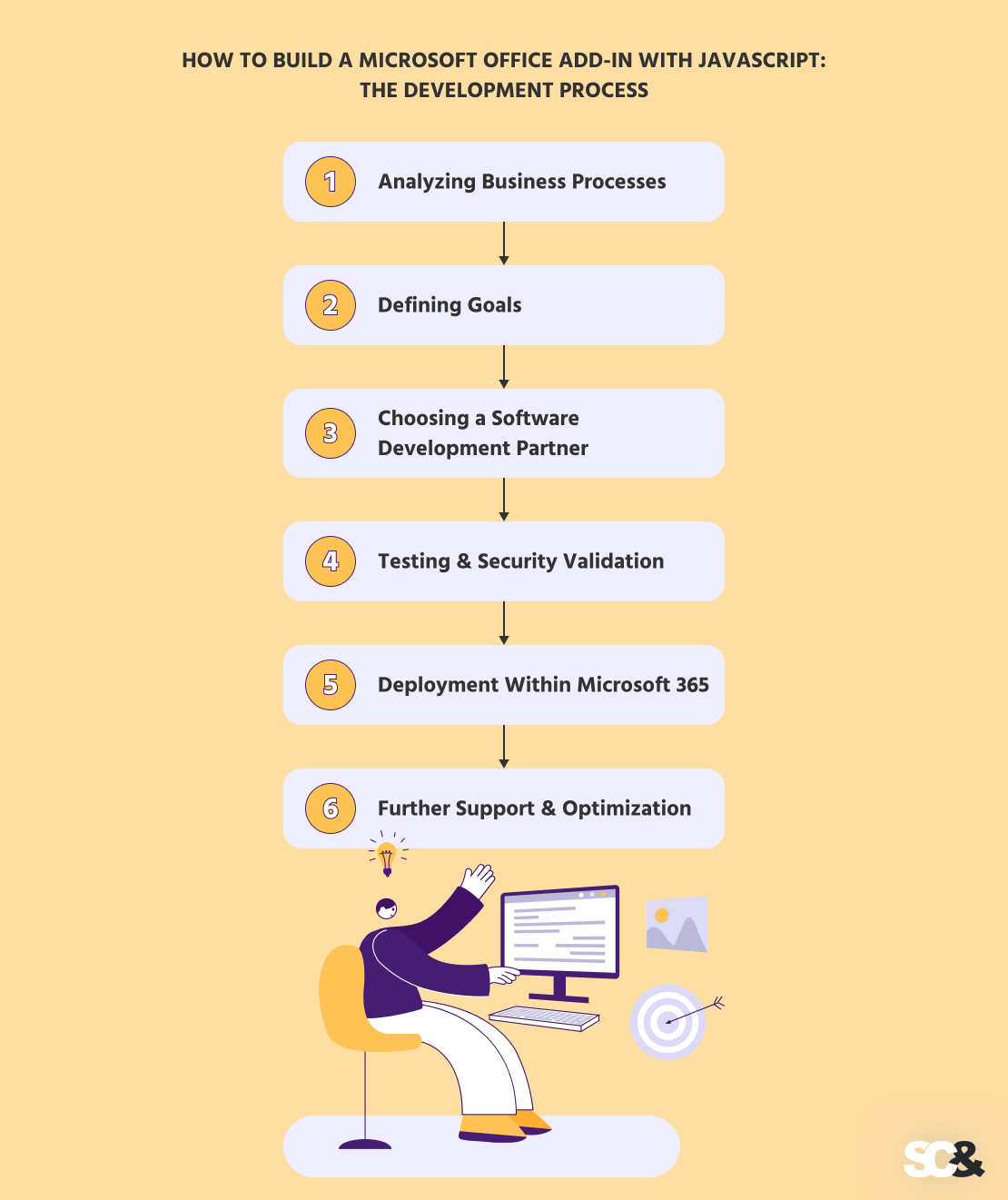
How to Build a Microsoft Office Add-in with JavaScript: The Development Process
Creating a custom Microsoft Office add-in may sound technical, but with the right approach and development partner, it becomes a strategic project rather than just a coding exercise.
Analyzing Business Processes
Before any development begins, the first step is an in-depth analysis of your business processes. This involves recognizing repetitive, time-consuming tasks, understanding where manual errors occur, and mapping out data flow between Office programs and other business systems.
Without a clear understanding of how your team works, even the most advanced add-in may fail to bring value.
Defining Goals
With processes analyzed, the next step is determining clear, measurable goals. Every add-in project should have objectives linked to tangible business outcomes. Goals are often tied to cost reduction, compliance, and employee satisfaction.
Choosing a Software Development Partner
If you want to provide a high-quality, business-aligned add-in, you need to have a trustworthy development partner.
A professional team typically starts by setting up an Office add-in project using tools like Visual Studio or Visual Studio Code, along with Node.js and the Yeoman generator.
This generator helps scaffold the correct project type, configure dependencies, and prepare the structure required to build add-ins using modern web technologies such as JavaScript, TypeScript, HTML, and CSS.
At the core of development is the Office JavaScript API, often referred to as Office.js. This JavaScript API allows the add-in to interact with the Office software, whether it’s Excel, PowerPoint, or another Office document environment.
Through APIs, developers can read and write data, automate workflows, open a dialog window for user interaction, and integrate external systems via a secure web application architecture. The add-in runs within a web server context but integrates seamlessly into Office apps across desktop and web versions of Microsoft Office.
A critical component of the solution is the manifest file, which defines how the add-in behaves, what permissions it requires, and in which Office apps it can run. The manifest connects the web application to the Office program and ensures proper configuration within Microsoft 365.
During development, teams regularly debug the solution and sideload the add-in into Excel, Outlook, or other Office apps to test functionality in real conditions before production release.
Testing & Security Validation
Before deployment, the add-in must undergo stringent testing and security validation. This step proves it performs as demanded across Windows, Mac, and Office Web apps and complies with organizational security and privacy policies.
Testing focuses on:
- Cross-platform functionality
- Accuracy of automated workflows
- Integration with internal systems
- Protection of sensitive or confidential data
Deployment Within Microsoft 365
When testing is complete, the add-in is deployed within the organization. Deployment can be managed centrally via Microsoft 365 Admin Center, SharePoint, or AppSource, making it immediately available to employees without extra software installation.
Benefits of proper deployment:
- Immediate access to the add-in in familiar Office applications
- Minimal disruption to existing work cycles
- Organization-wide adoption with centralized updates
Further Support & Optimization
Launch is only the beginning. To provide value, organizations should plan for further support and optimization. It might include updating the add-in to accommodate new business systems, adding features based on user feedback, and providing compatibility with updated Office versions.
For example, if an organization implements a new CRM system, the add-in can be updated to integrate with the new platform.
Best Practices for Building Office Add-ins
Developing an add-in with JavaScript is not only about adding new functionality to Word, Excel, or Outlook. Following proven best practices guarantees that the add-in provides long-term business value instead of becoming a short-lived technical experiment.
Security
Security must be considered from the earliest stages of development. Office add-ins often interact with sensitive corporate data such as financial reports, customer records, internal communications, or legal documents. If security is treated as an afterthought, the risks can outweigh the benefits of automation.
A well-designed add-in must use secure authentication mechanisms, encrypted communication channels, and strict access controls to assure that only authorized users can retrieve or modify data.
It should also follow internal IT governance policies and industry regulations where applicable.
Performance
Performance plays a crucial role in user adoption. If an add-in loads slowly, freezes the interface, or delays document processing, users are likely to abandon it regardless of its potential benefits.
Efficient Office add-ins are created to retrieve only the data necessary for a specific task, rather than loading large datasets unnecessarily. They rely on optimized communication with backend systems and minimize resource consumption within the Office environment.
Cross-Platform Compatibility
Modern organizations rarely operate within a single device environment. Teams may use Windows desktops in the office, MacBooks at home, and Office on the web while traveling. A successful Office add-in must provide uniform functionality and performance on all supported platforms.
Accessibility & UI/UX
Even the most technically advanced add-in will fail if it is difficult to use. A well-designed user interface should feel like a natural extension of the Office rather than an external tool.
For example, a Word add-in developed to automate contract generation should guide users through each step in a straightforward manner, making complex processes simple and consistent.
When usability and accessibility are prioritized, organizations not only double adoption rates but also improve employee productivity and overall satisfaction.
Advanced Enhancements
When an add-in is successfully deployed, organizations can further expand its value through advanced enhancements.

- Integrating with Microsoft Graph: Microsoft Graph enables Office add-ins to access and interact with data across the entire Microsoft 365 ecosystem. Instead of operating in isolation, an add-in can connect to calendars, emails, user profiles, SharePoint documents, Teams conversations, and more.
- Using Modern Frameworks (React, Angular, Vue): With modern frameworks, add-ins can offer dynamic dashboards, live filtering, interactive forms, and intuitive navigation that feels modern and uniform with other enterprise tools. For instance, a PowerPoint add-in used for proposal generation can include interactive configuration panels where sales teams select products, pricing models, and templates in real time.
- AI/LLM and Automation Enhancements: Artificial intelligence and large language models are increasingly integrated into business workflows, and Office add-ins can serve as an ideal interface for AI-driven insights. By connecting to machine learning services or AI APIs, add-ins can analyze historical data to forecast trends or highlight anomalies.
- Offline Capability and Local Storage Strategies: Although many add-ins rely on cloud connectivity, certain business environments require functionality even when internet access is limited. By implementing offline capabilities and local storage strategies, organizations ensure continuity of operations.
Why Work with SCAND for Office Add-in Development?
Choosing the right partner makes a big difference when building a custom Microsoft Office add-in. SCAND focuses on creating solutions that are not only technically sound but also practical and valuable for your business.
With 25+ years of experience in enterprise software development, SCAND understands how to build add-ins that work reliably within complex company environments.
We help connect Office applications to your existing systems, pay close attention to security, and execute thorough testing to guarantee the flawless operation of all declared capabilities.
Most importantly, every project we make is designed with clear business goals in mind, be it saving time, lowering costs, or improving work cycles. The result is a custom Office add-in that supports your team and brings real, measurable value.
Conclusion
Custom Microsoft Office add-ins are a strategic investment for businesses looking to simplify their daily work, improve productivity, and gain insights. And with JavaScript, add-ins become future-proof, scalable, and adjustable.