

Digital transformation has already changed our lives a lot and is continuing to change further, bringing new opportunities and introducing new terms like digital assets and the systems to manage them.
What is digital asset management, and why is it important? These are the notions we are going to explain in this blog post.
What Are Digital Assets?
The definition of a digital asset differs from source to source and keeps changing as more things go digital. Most often, the term refers to media content like photos, videos, and other things that represent a brand.
We would also use a digital asset to describe file-based knowledge (books, guidelines, product catalogs, training courses for new employees), software, documents, and many more things that have value for a particular company.
Summing up a range of definitions, digital assets are valuable files of different formats that state the right to use them.
Here are some examples of digital assets: photos and videos, audio files, text documents, graphics, slide decks, spreadsheets, patents, PDF files, etc. The asset can not necessarily be digital from the beginning: for example, with the help of digital publishing software, books and newspapers are turned into digital files.
What Is Digital Asset Management: Definition & Work Principles
Let us now define digital asset management. It is a combination of a software solution and an approach to a workflow that allows the organization of digital assets as well as the process of their creation, ensures effective distribution, and much more.

A good DAM (digital asset management) solution integrates with other systems used within the company in order to seamlessly fit the existing workflow.
In order to implement such a solution, it is crucial to thoughtfully plan taxonomy — the system of keywords and metadata that will be used to tag files in order to organize them effectively and find them faster and simpler.
It should be created considering the tasks of all the company’s departments and specialists who will use this DAM.
Why Is Digital Asset Management Important?
If your company has digital assets (we bet that it has), you definitely need a DAM system to improve management and reap benefits. Here are the core advantages of a digital asset management system:
Accelerated Processes
The DAM solution cuts down the time employees spend searching for the required asset and eliminates the need for additional work. In case a file cannot be found, someone will have to either create a new one or upload it once more.
That will steal working time and create a duplicate file in the system. With the help of a digital asset management solution, all the assets are found quickly and easily.
Better Collaboration
DAM facilitates fast and smooth data distribution and provides tools for managing tasks (setting up deadlines and assigning them to a particular person). This helps to outline everyone’s responsibilities and improve communication between teams and colleagues, regardless of their location.
Faster Time-to-Market
Combining the two previous benefits, we get the acceleration of the release of new products, ad campaigns, updates, etc. This can help to leave the competitors behind as well as improve the product faster based on customers’ feedback.
Stronger Security
Security is one of the core features of a digital asset management system. Along with the mechanisms of keeping data protected, secure digital asset management software allows providing users (company employees) with different levels of access. Hence, everyone sees only the information they really need to complete tasks.
Enhanced Analytics
With the help of DAM, it is easier to collect, manage, and interpret data from various sources. That allows the business to empower its analytics, make predictions more accurate, and streamline decision-making.
Simplified License-Compliance
With all the assets right in front of your eyes, together with the necessary product information about each of them, it is easy to track compliance with the licenses that might have changed or expired. This option eliminates the risk of missing the moment to renew the required documents.
Brand Consistency
Digital asset management systems are often used by marketing departments and companies specializing in content production.
Sharing the same materials between all the involved specialists (both in-house and contractors like agencies or freelancers) ensures maintaining brand style and consistency across all the channels the brand uses for communication.
Which Industries and Teams Use DAMs?
DAM tools are used in a wide range of industries, especially where managing large volumes of digital content is part of all day-to-day operations.
For example, marketing and advertising, e-commerce, media and entertainment, healthcare, and finance all rely on DAM platforms to arrange assets, maintain compliance, and support uniform brand communication.
At the same time, within organizations themselves, DAM solutions play a no less important role in assisting different teams.
In particular, marketing and brand teams use them to manage campaigns and have cohesive messaging across channels, while creative teams depend on them to store, access, and reuse design files.
Similarly, sales teams benefit from having quick access to up-to-date materials, and product or e-commerce teams use DAM to manage product-related content. HR and internal communications teams, in turn, apply these systems to organize training materials and internal documentation.
Types of Digital Asset Management Systems
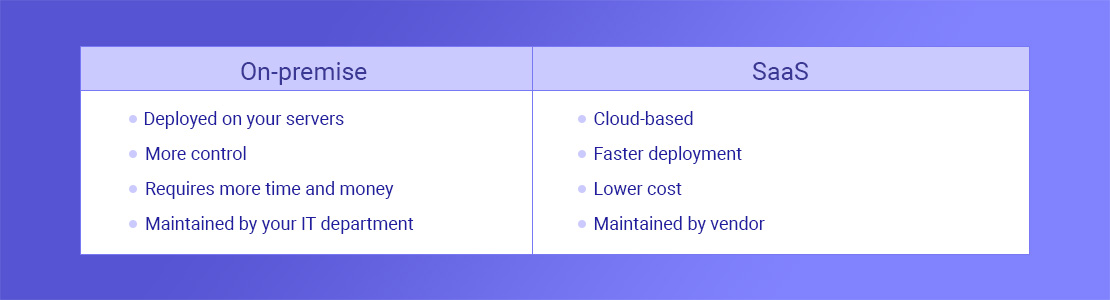
There are two main types of digital asset management solutions: on-premise and SaaS. Here are the differences:
On-premise
This type of DAM is deployed on your company’s servers, fully managed by your IT department, and relies on your network. While providing more customization opportunities and control over the data, it makes you handle such things as security, support, updates, and upgrades, as well as ensuring the required infrastructure.
SaaS
SaaS (software as a service) systems are cloud-based and managed by the vendor. This type allows less flexibility, but it provides a number of significant benefits: global access, short deployment time, lower cost, and delegating main support and management responsibilities to your vendor.
Hybrid
There is also an option combining the advantages of both previous DAM solutions — the hybrid one. It implies having one digital asset management system that uses clouds and on-premise servers to provide easy global distribution of SaaS solutions, along with the control and customization levels of hosted solutions.
What Are the Key Features to Look for in DAM Software?
When evaluating DAM software, it’s important to look beyond basic storage and focus on features that support the full content lifecycle. In particular, the right solution should help teams not only store assets, but also arrange, find, distribute, and fine-tune them.
First of all, pay close attention to a centralized asset library, as it creates a single source of truth where all files are stored and easily accessible. This eliminates content silos and proves that teams always work with the most up-to-date versions.
Equally important is metadata and advanced search functionality. By tagging assets with structured metadata and using filters or AI-powered search, teams can quickly locate files, even within large content libraries.
In addition, consider version control and asset lifecycle management. These features allow teams to track changes, manage updates, and maintain a clear history of each asset, reducing duplication and preventing the use of outdated files.
Another key capability is access control and permissions, which guarantees that users only see and edit assets relevant to their roles and helps establish relevant compliance across teams.
Finally, strong integration capabilities and analytics make a DAM platform a truly valuable tool. Integrations with CMS, CRM, and design tools provide a steady content flow within platforms, while analytics provide insights into asset usage and performance.
Digital Asset Management Tools
Suppose your business is not large and has no specific and strict requirements; most likely, you will find an appropriate DAM tool among the existing solutions. Here are some of the popular digital asset management examples:
Adobe Experience Manager Assets
A solution from Adobe focused on improving the process of content creation and distribution as well as enhancing communication between engaged departments and individuals.
- Canto: A well-designed and easy-to-use tool with a user-friendly interface and an emphasis on visual content and productive teamwork.
- Cloudinary: A digital asset management system empowered by AI that helps you with tagging. It allows for the adoption and implementation of new media requirements as fast as possible.
- MediaValet: MediaValet allows uploading files up to 5TB as well as working on content in native apps like Photoshop or Sketch.
- Widen: Having more than 70 years of experience in marketing, Widen provides a DAM solution that controls enterprise governance and converts files automatically.
How To Choose A Digital Asset Management System
In order to choose the most suitable variant of DAM provided in the digital asset management market, a lot should be considered. Here is a list of steps to follow: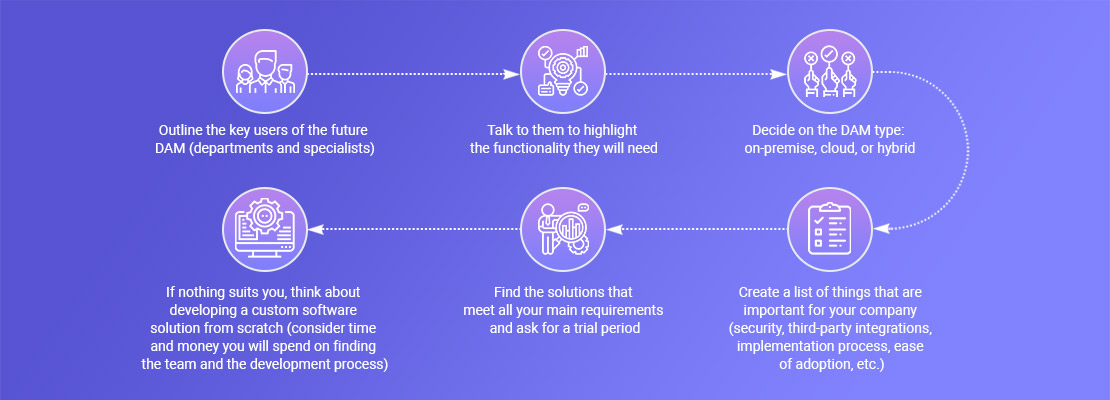
How to Develop a Digital Asset Management System
In certain cases, organizations may find that existing DAM platforms do not fully meet their unique needs. In such situations, the development of a custom DAM system becomes a viable and strategic option.
Developing a DAM platform requires careful planning, technical expertise, and a clear understanding of the organization’s specific requirements.
Therefore, it is necessary to entrust the project to a reliable development company that will perform the following steps to build asset management software:
Define Requirements
Before diving into development, it’s crucial to clearly define the requirements of the DAM software. This involves understanding the workflows, user roles, features, and integrations needed. Key considerations include:
- User Roles: Defining different user roles, such as administrators, contributors, and viewers, each with specific permissions and access levels.
- File Types: Identifying the types of digital assets the system will manage, whether they are images, videos, documents, or a combination of several types.
- Metadata Structure: Outlining the metadata fields necessary for quick and correct asset classification and retrieval.
- Integration Needs: Identifying any third-party systems or applications that the DAM system needs to integrate with, such as content management systems or marketing platforms.
Choose Technology Stack
Selecting the right technology stack is important for the successful development of a DAM software, as well as for scalability, security, and compatibility. Common components of a DAM technology stack include:
- Backend: Choosing a backend language or framework suitable for the organization’s needs, such as Java, .NET, Django, or Laravel.
- Database: Selecting a robust database system for storing metadata and asset information, such as MySQL, PostgreSQL, or MongoDB.
- Frontend: Choosing a frontend framework for the user interface, such as React, Angular, or Vue.js.
- Cloud Storage: Deciding whether to use cloud storage solutions like Amazon S3, Google Cloud Storage, or Azure Blob Storage for storing digital assets.
Development
Once the requirements and technology stack are in place, it’s time to move on to the development process. Work with a skilled development team that follows an iterative development approach. Key development steps include:
- User Interface (UI) Design: Creating a convenient and compelling interface that aligns with the defined requirements.
- Backend Development: Developing the backend infrastructure to manage user authentication, file storage, metadata management, and access control.
- Integration: Implementing any necessary integrations with other systems or applications.
- Metadata Management: Developing a robust system for managing metadata, allowing for effective asset categorization and search functionalities.
Testing and Quality Assurance
Comprehensive testing is essential to confirm that DAM software functions as expected. Make sure your system passes various types of QA testing, including:
- Functionality Testing: Verifying that all features and functionalities work according to the specifications.
- Security Testing: Assessing the system’s security mechanisms to protect against data leaks and unauthorized access.
- Performance Testing: Testing the system’s functionality under different loads to guarantee it can handle the expected user traffic.
Deployment
After successful testing, it’s vital to arrange proper digital asset management implementation. A smooth transition is usually accompanied by:
- Data Migration: If moving from an existing system, it’s crucial for data to fully migrate to the new DAM tool.
- Training: Providing training sessions for users to help them get acquainted with the new system and its features.
- Monitoring: Using monitoring tools to supervise system performance and user activities post-deployment.
Maintenance and Updates
A DAM system requires ongoing maintenance to cope with any issues, implement updates, and adjust to different organizational needs. Regularly check the system, collect user feedback, and make continuous improvements based on evolving requirements.
What’s Next: DAM System Trends Shaping 2026 and Beyond
DAM systems are undergoing a switch from simple data storage solutions to comprehensive platforms. Indeed, modern DAM platforms are taking center stage in content management workflows, providing support for the entire content lifecycle.
One of the most valuable developments has been the adoption of AI-driven automation. DAM solutions use AI not only for automated tagging and intelligent search but also to generate predictive analytics and provide content recommendations.
Another important trend is the shift toward composable and API-first architectures. This approach allows organizations to get flexible tech stacks where DAM integrates with other tools and delivers content to multiple touchpoints, including mobile apps and emerging digital platforms.
In addition, governance, compliance, and content authenticity are becoming top priorities. As companies manage increasing volumes of content, especially AI-generated assets, DAM systems are expected to have proper usage rights, brand management, and regulatory compliance.
Finally, DAM is turning into an intelligent content hub rather than just a repository. It is now expected to support live collaboration, enable personalized content delivery, and provide actionable insights that help marketing teams make faster, data-driven decisions.
The Bottom Line
Managing digital assets is no longer a thing you can overlook. Effectively handling digital files not only boosts productivity but also helps maintain brand consistency, promotes collaboration, and ensures overall organizational success.
Whether you choose an existing digital asset management (DAM) platform or create a customized solution, investing in a strong DAM strategy will pay off in the long term.
Having relevant expertise and experience, our software development team can help you either customize and improve the existing DAM solutions or build a new one that will perfectly meet your company’s requirements and goals. If you have any questions, feel free to contact us.
Frequently Asked Questions (FAQs)
How is DAM software different from cloud storage, and why should I go for a DAM?
That’s a common question. At first glance, DAM and cloud storage might seem similar since both store files. However, cloud storage is made mainly for keeping and sharing files, while a DAM tool is built to manage them. With DAM, you can tag assets, instantly search them, control versions, and set permissions.
What is the difference between a CMS and a DAM?
In simple terms, a DAM stores and organizes your digital assets, while a CMS helps you publish content. For example, you might store images and videos in your DAM, and then use your CMS to place them on your website. In most modern setups, the two systems work together rather than replace each other.
How will DAM software improve our workflow and productivity?
In practice, teams usually notice the difference pretty quickly. Instead of wasting time searching for files or recreating lost assets, everything is stored in one place and easy to find. On top of that, built-in workflows and approvals help reduce back-and-forth, so projects move forward faster and with fewer mistakes.
What are the most common DAM solution use cases?
Most companies start using DAM for marketing purposes, such as managing campaign assets or brand materials. However, over time, they often expand their use to areas like e-commerce content, internal documentation, and even training materials. Essentially, any team that deals with a lot of digital files can benefit from it.
How does DAM software integrate with existing systems?
This is something many teams worry about, but most DAMs are made to fit into your existing setup. They typically integrate with tools like CMS platforms, CRMs, and design software.
What file types do DAM systems support?
In most cases, DAM software supports all the common file types you already use, such as images, videos, audio files, documents, PDFs, presentations, and even design files. So, instead of juggling multiple tools, you can manage everything in one place without worrying about compatibility.