
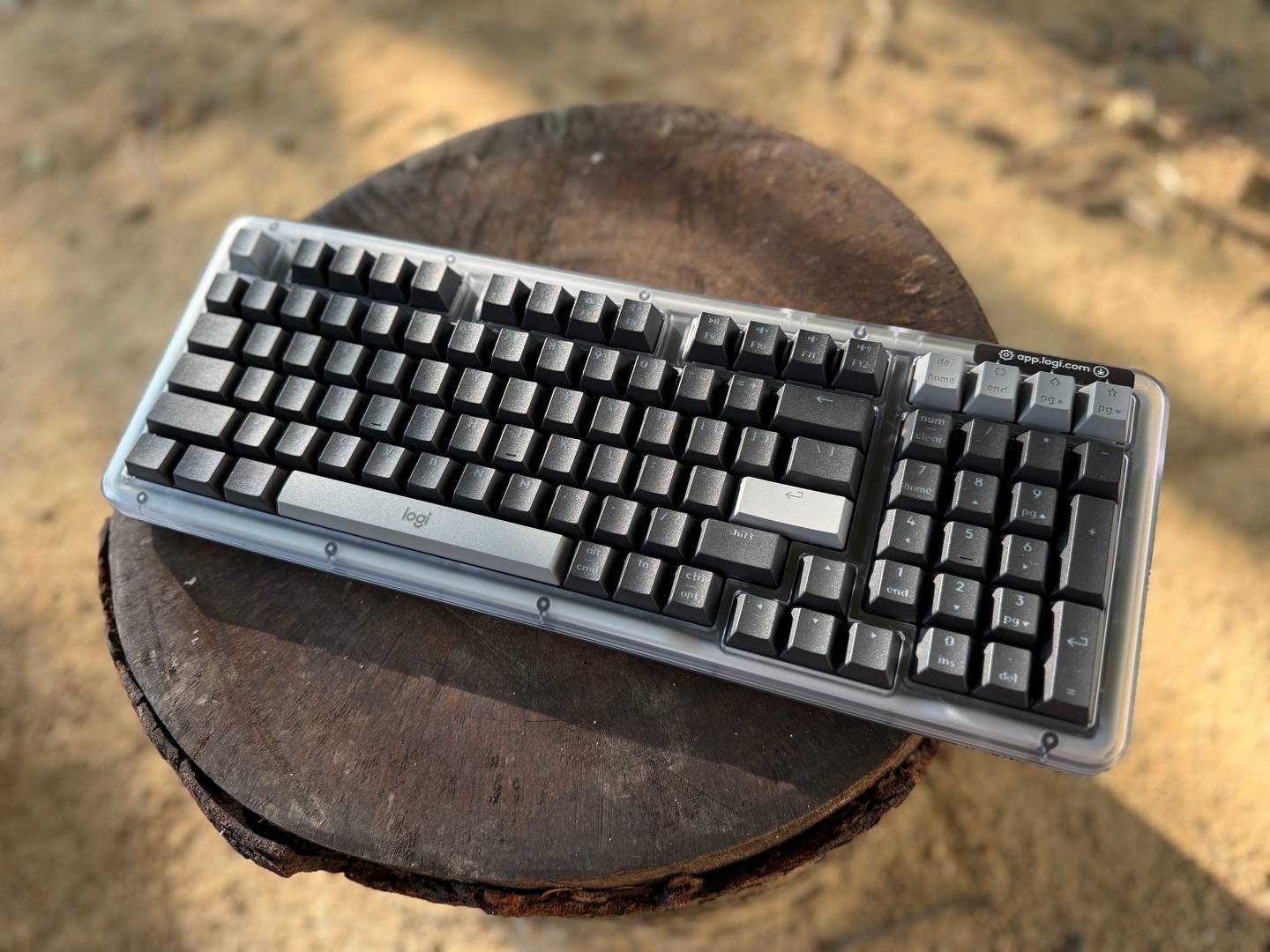
Logitech has spent years dominating the productivity keyboard market with devices like the MX Keys, but those are membrane boards. The Logitech Alto Keys K98M changes that formula entirely. Launched in late 2025 at $99.99 to $119.99, this wireless mechanical keyboard brings enthusiast features like gasket mounting and hot-swappable switches to an audience that typically settles for basic scissor-switch setups.
After weeks of testing, the question isn’t whether Logitech can build a mechanical keyboard, it’s whether this board can compete with established players like Keychron while maintaining the polish Logitech users expect.
Design and Build Quality

The Logitech Alto Keys K98M adopts a 96% layout, cramming a full numpad and function row into a footprint smaller than traditional full-size keyboards. Available in Graphite (gray), white-gray (Mac variant), and Lilac (soft blue with transparent accents), the design skews professional rather than flashy. There’s no RGB light show here, just clean white backlighting with seven brightness levels that won’t annoy coworkers on video calls.
Build quality feels solid for the price. The chassis uses up to 25% recycled plastics, continuing Logitech’s sustainability push without sacrificing durability. PBT keycaps resist shine better than the ABS plastic found on cheaper boards, and the shine-through legends remain legible even at lower backlight levels. However, some users report uneven backlighting on certain keys, particularly around the edges of the board.

One thing worth noting is that he 96% layout means it’s smaller than traditional full-sized keyboards. For starters, it’s missing the dedicated navigation cluster in the middle. Instead, Logitech has moved it to the top of the numpad, which might be an awkward position for some.
Also, the numpad zero key is half-sized. This might frustrate some users like accountants and data-entry professionals who rely on muscle memory. The arrow cluster is also a little cramped, which might take some getting used to. If you’re upgrading from Logitech’s MX Keys or a similar full-size board, there will be a slight learning curve before your typing accuracy and speed returns to normal.
Typing Experience: Gasket Mount Delivers

This is where the Alto Keys K98M justifies its existence. Logitech’s UniCushion gasket mount suspends the PCB in vibration-dampening material, creating a cushioned, “thocky” sound profile that stands out in shared workspaces. Unlike rigid tray-mount keyboards that sound hollow and harsh, the K98M absorbs vibrations for a softer acoustic signature that won’t grate on your ears during marathon typing sessions.
For a bit of context, gasket-mounted keyboards started out in the mechanical keyboard hobbyist scene. The idea behind it is that it helps to soften the typing experience with a bit of “bounce,” while also making keystrokes sound less harsh. It’s nice to see Logitech adopt this feature and bring it to its mainstream keyboards.

The keyboard comes with Marble linear switches, which are surprisingly smooth. I am a bit of a mechanical keyboard snob so having switches that sound and feel great out of the box without modifications or lubrication is a nice surprise. The typing feel that falls somewhere between budget Gaterons and premium options like Gateron Oil Kings.
They’re not necessarily the “best” switches on the market. However, unless you’re an enthusiast, they’re perfectly adequate for office work and significantly more satisfying than any membrane board. That being said, the spacebar exhibits slight rattle out of the box, but this can be fixed with basic stabilizer tuning if you’re willing to open the case.
Hot-swappability is the K98M’s secret weapon. The board accepts any 3-pin or 5-pin Cherry MX-compatible switches, meaning you can swap in silent linears for library-quiet typing or tactile switches for more feedback. This level of customization typically requires spending $200+ on boards from boutique brands.
Connectivity and Battery Life

The wireless performance is flawless. The Alto Keys K98M supports Bluetooth connectivity for up to three devices and includes Logi Bolt USB receiver compatibility for more stable connections. Switching between devices is seamless through dedicated keys, making this ideal for users juggling a work laptop, personal desktop, and tablet throughout the day.
Logitech claims 12 months of battery with backlighting disabled. However, I’ve only had this keyboard for a few weeks, but I did not need to charge it since I got it. However, if Logitech’s claims are true, it might beat out competitors like the Keychron Q5 Max that require monthly charging. The lack of wired mode is the only connectivity disappointment, so gamers seeking high polling rates should look elsewhere.
Software: Logi Options+ Hits and Misses
Logi Options+ software integrates AI shortcuts and multi-device profiles smoothly, continuing the smart automation Logitech pioneered with the MX Keys S. You can remap function row keys to launch applications or trigger macros, and the ChatGPT quick-access key actually proves useful for quick queries without breaking workflow.
The limitations become apparent when you want deeper customization. Unlike enthusiast boards that support VIA or QMK firmware, the K98M restricts remapping to the F-row only. Power users who want per-key customization or complex macro chains will feel constrained. However, for the target audience, such as productivity-focused professionals rather than hobbyists, the simplified approach reduces friction and maintains the “it just works” philosophy.
Who Should Buy the Alto Keys K98M?

The Logitech Alto Keys K98M excels as an enthusiast entry point. If you’re currently using Logitech’s membrane keyboards and curious about mechanical switches, this board delivers premium typing feel without overwhelming you with customization options. The gasket mount and hot-swap PCB democratize features previously locked behind $300+ price tags, and Logitech’s ecosystem integration means it pairs effortlessly with other Logi peripherals.
Writers and coders will appreciate the improved typing experience and compact layout that saves desk space. However, heavy data-entry users should consider the layout quirks carefully. That half-sized numpad zero and cramped navigation cluster could hinder productivity rather than enhance it. You could always pair the K98M with an external numpad if it really bothers you.
The K98M also makes sense for Android users seeking reliable Bluetooth keyboard connectivity for tablets or phones. Multi-device switching eliminates the need for separate mobile keyboards, consolidating your setup.
Value Proposition: K98M vs. Competition

At $99.99 to $119.99, the Alto Keys K98M undercuts competitors while delivering similar features. The Keychron K2 HE offers magnetic switches and more customization for roughly the same price, but lacks the gasket mount’s refined sound. NuPhy Air96 V2 and Epomaker TH98 provide alternative options, though neither integrates with Logitech’s software ecosystem.
The real comparison is internal: how does the K98M stack up against Logitech’s own MX Keys lineup? If you prioritize typing satisfaction and don’t mind the layout adjustments, the mechanical switches justify the upgrade. However, if you value backlighting quality and ergonomic consistency over switch feel, the MX Keys remains the safer choice.
Conclusion
Logitech has done a fantastic job with the Alto Keys K98M. From an enthusiast point-of-view, there are definitely better options out there. However, for its features and its price, it’s a great recommendation for those looking to up their productivity game or are looking to dive into the mechanical keyboard scene.
Features like gasket mounting and hot-swappable switches at this price point represent excellent value, and the typing experience surpasses any membrane alternative Logitech offers. Of course it’s far from perfect. Layout quirks and limited software customization prevent this from dethroning Keychron’s dominance in the wireless mechanical space, but for productivity users invested in Logitech’s ecosystem, the K98M delivers exactly what it promises: mechanical satisfaction without gamer aesthetics or hobbyist complexity.
If you’re ready to graduate from membrane keyboards but intimidated by the custom mechanical scene, the Alto Keys K98M offers the perfect stepping stone at a price that won’t break the bank.
Note: this article may contain affiliate links that help support our authors and keep the Phandroid servers running.