
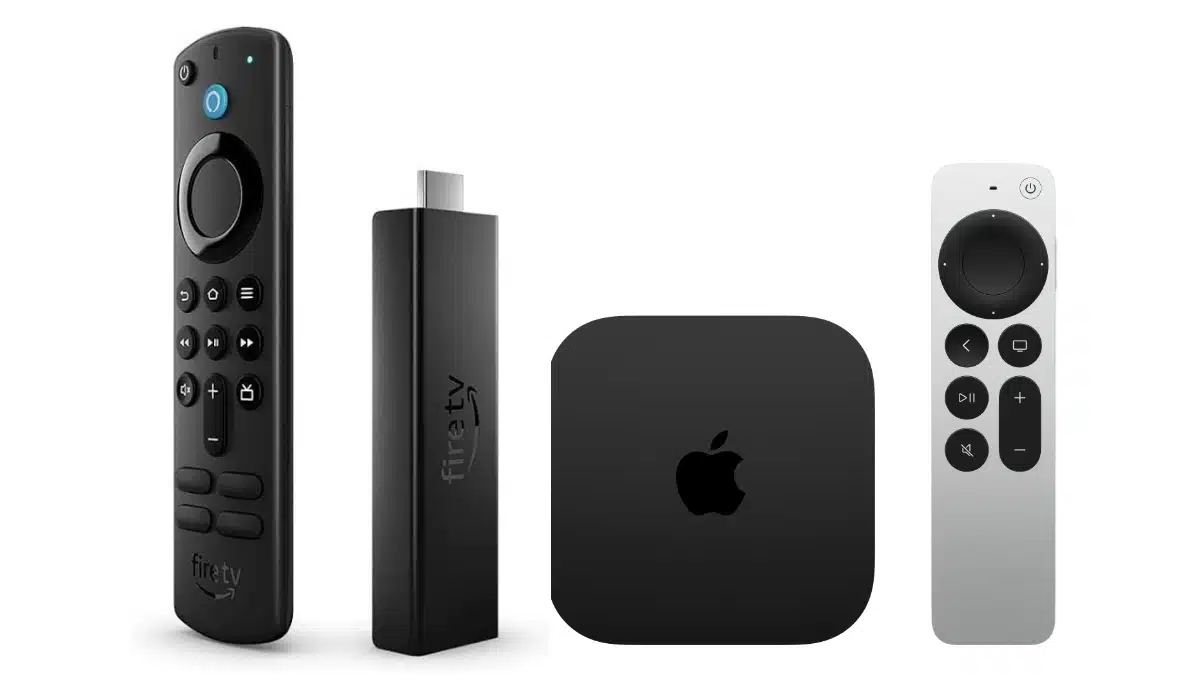
The best streaming stick right now is the Roku Streaming Stick 4K; it delivers 4K HDR with Dolby Vision, runs a clean ad-light interface, and costs under $50. But it isn’t the right choice for everyone. Whether you’re deep in the Amazon ecosystem, want the tightest Apple integration money can buy, or just need something cheap for a spare TV, there’s a better fit for your situation.
This guide breaks down the top streaming sticks and compact set-top boxes available in the US right now, what each one does best, and who should actually buy it.

Quick Comparison: Best Streaming Sticks in the US
| Device | Price | Resolution | Best For |
|---|---|---|---|
| Roku Streaming Stick 4K Top Pick | ~$49 | 4K HDR / Dolby Vision | Most people — clean UI, no ecosystem lock-in |
| Amazon Fire TV Stick 4K Max | ~$60 | 4K HDR / Dolby Vision | Amazon / Alexa households |
| Amazon Fire TV Stick HD | ~$25 | 1080p HD | Budget buyers, older TVs |
| Roku Streaming Stick Plus 4K | ~$40 | 4K HDR / HDR / HDR10+ | Budget 4K pick |
| Apple TV 4K (3rd Gen) | ~$129 | 4K HDR / Dolby Vision | iPhone / iPad / Mac users |
| Google TV Streamer | ~$99 | 4K HDR / Dolby Vision | Android / Google ecosystem users |
Roku Streaming Stick 4K: Best Overall
Price: ~$49 | Resolution: 4K HDR, Dolby Vision, HDR10+
The Roku Streaming Stick 4K is the streaming stick most people should buy. It plugs directly into your TV’s HDMI port with no external power brick needed, supports 4K HDR with Dolby Vision and HDR10+, and gives you access to every major streaming service – Netflix, Hulu, Disney+, Max, Peacock, Apple TV+, and hundreds of free ad-supported channels through Roku’s own Live TV and Featured Free sections.
What sets Roku apart is its interface. It’s straightforward and genuinely app-neutral; it doesn’t prioritize one streaming service over another or flood you with ads the way Amazon’s Fire TV does. If you search for a movie, Roku shows you which apps carry it and at what price, including free options.
It also happens to be one of the most portable streaming sticks available. It’s small enough to toss in a travel bag and, unlike some rivals, it’s unusually good at authenticating onto complicated hotel Wi-Fi networks.
Who should buy it: Anyone who doesn’t have a strong loyalty to Amazon’s or Google’s ecosystem. It’s the cleanest, most versatile option at this price.
Pros:
- Clean, ad-light interface
- Works with all major streaming apps
- No ecosystem lock-in
- Dolby Vision + HDR10+ support
- Very portable
Cons:
- No Ethernet port (that’s the Roku Ultra)
- Voice remote lacks a headphone jack
Amazon Fire TV Stick 4K Max (2nd Gen): Best for Amazon/Alexa Users
Price: ~$60 (frequently on sale for ~$35) | Resolution: 4K HDR, Dolby Vision, Dolby Atmos
The Fire TV Stick 4K Max is Amazon’s most powerful streaming stick, and it’s genuinely impressive hardware for the price. It runs on a fast 2.0 GHz quad-core processor, supports Wi-Fi 6E for smoother streaming on busy home networks, packs 16GB of storage (double its predecessor), and handles 4K Ultra HD with Dolby Vision and Dolby Atmos.
The Alexa Voice Remote Enhanced bundled with it gives you hands-on control over compatible smart home devices directly from your couch, which is handy if you’re already using Alexa-enabled lights, thermostats, or cameras. You can even pull up live camera feeds in a picture-in-picture window without stopping your show.
The Ambient Experience feature turns your TV into an art display when idle, and generative AI features let you create custom images via Alexa. Cloud gaming via Xbox Game Pass is also supported, so you can stream Xbox titles without a console.
The main trade-off is the interface: Fire TV heavily prioritizes Prime Video content and surfaces more advertising than Roku or Google TV. If you’re a Prime member, that’s less of an issue, as you’re already in the ecosystem. If you’re not, it can feel pushy.
It’s also worth noting the device still uses Micro USB for power rather than USB-C, which feels dated at this price point.
Who should buy it: Amazon Prime subscribers and Alexa smart home users who want maximum performance from a streaming stick without spending Apple TV money.
Pros:
- Wi-Fi 6E for fast, stable 4K streaming
- 16GB storage \u2014 room for lots of apps
- Excellent Alexa integration
- Xbox cloud gaming support
- Great value on sale
Cons:
- Interface pushes Prime Video and ads
- Micro USB power (not USB-C)
- Bulky around the HDMI port
Amazon Fire TV Stick HD: Best Budget Streaming Stick
Price: ~$35 | Resolution: 1080p Full HD
If you have a 1080p TV, or you just need an inexpensive stick for a guest room or bedroom TV, the Fire TV Stick HD is the most sensible buy. It streams in Full HD with Dolby Atmos audio support, runs the updated Fire TV interface with user profiles, and gives you access to every major streaming app.
It won’t do 4K, and the interface carries the same Prime Video-heavy bias as its more expensive siblings. But for basic cord-cutting on a tight budget, it does the job reliably.
Who should buy it: Budget-conscious buyers with 1080p TVs, or anyone outfitting a secondary screen.
Roku Streaming Stick Plus 4K: Best Budget 4K Streaming Stick
Price: ~$40 | Resolution: 4K HDR, HDR10+
The Roku Streaming Stick Plus 4K is Roku’s current budget 4K option, replacing the now-discontinued Roku Express 4K+. Launched in 2025, it is a slim HDMI stick that plugs directly into the back of your TV and can draw power from your TV’s USB port – no wall outlet needed. It runs the same clean, app-neutral Roku interface that makes the brand so appealing, and gives access to all the major streaming services.
One trade-off worth knowing is that the Streaming Stick Plus drops Dolby Vision that is present in the pricier Streaming Stick 4K, and offers HDR10+ instead.
Who should buy it: Anyone who wants 4K HDR streaming at the lowest possible Roku price and isn’t bothered by a no-frills remote.
Apple TV 4K (3rd Gen): Best for iPhone/iPad/Mac Users
Price: ~$129-$149 | Resolution: 4K HDR, Dolby Vision, Dolby Atmos
The Apple TV 4K is the premium end of the streaming stick and compact set-top boxes market, and it justifies its price primarily through ecosystem integration. If you own an iPhone, iPad, or Mac, the experience is noticeably tighter than anything else here: AirPlay streaming from your iPhone works flawlessly, the Control Center remote on your iPhone activates instantly.
It runs on an A15 Bionic chip, which is the same processor that powered the iPhone 13 series and the standard iPhone 14, delivering good 4K HDR playback with zero buffering lag and fast app load times. The interface is clean and well-organized, and the Apple Arcade gaming library adds a dimension no other streaming stick offers.
It’s also the most expensive option here by a wide margin, and if you’re not already in Apple’s ecosystem, most of that premium evaporates. Non-Apple users would get more value from the Roku or Google TV options.
Who should buy it: iPhone and Mac users who want the tightest possible integration and don’t mind paying for it.
Pros:
- Best-in-class performance
- Seamless iPhone/iPad/Mac integration
- Apple Arcade gaming library
- Clean, focused interface
Cons:
- Most expensive option by far
- Limited value outside the Apple ecosystem
Google TV Streamer: Best for Android/Google Users
Price: ~$99 | Resolution: 4K HDR, Dolby Vision, Dolby Atmos
The Google TV Streamer (which replaced the Chromecast with Google TV) is Google’s most capable streaming device yet. It runs a faster processor than its Chromecast predecessor with more RAM, and it incorporates a Smart Home dashboard for controlling Google Home devices — lights, thermostats, doorbells — directly from the TV.
What makes Google TV’s interface stand out is how it aggregates content across all your subscribed services. Rather than having to open each app separately, it pulls together what you’re watching and recommends titles in a unified home screen, making it the best interface for discovering new content across your subscriptions.
At $99, it’s significantly more expensive than the Roku Streaming Stick 4K and harder to justify unless you’re committed to the Google/Android ecosystem.
Who should buy it: Android smartphone users and Google Home smart home users who want a unified streaming and home control hub.
What to Look for When Buying a Streaming Stick or Compact Set-top Box
Resolution: If your TV supports 4K, get a 4K streaming stick or compact set-top box. The price difference over HD models is small, and you’ll future-proof your setup.
HDR format support: Look for Dolby Vision support if your TV supports it: it delivers better brightness and contrast than standard HDR10.
Audio: Dolby Atmos support matters if you have a soundbar or surround sound system.
Interface/ecosystem: This is the biggest differentiator. Roku is the most neutral. Amazon pushes Prime Video. Apple and Google are each excellent within their own ecosystems.
Wi-Fi: Wi-Fi 6 or 6E matters most in homes with many connected devices where network congestion is an issue.
Storage: More storage means room for more apps. 16GB (Fire TV Stick 4K Max) is more comfortable than 8GB for app-heavy users.
Frequently Asked Questions
What is the best streaming stick in 2026?
For most people, the Roku Streaming Stick 4K is the best streaming stick. It balances 4K HDR picture quality, a clean interface, broad app support, and value under $50.
Is Roku or Fire TV better?
Roku has a cleaner, less ad-heavy interface and doesn’t favor any one streaming service. Fire TV is better if you’re a Prime subscriber or Alexa smart home user. For general use, Roku edges ahead.
Do I need a 4K streaming stick if I have a 4K TV?
Yes. Your TV’s built-in streaming apps may not be optimized to output the best possible 4K HDR picture. A dedicated 4K streaming stick often delivers a sharper, smoother experience than built-in smart TV software.
Can I use a streaming stick on any TV?
Any TV with an HDMI port. Most streaming sticks also require an internet connection and a power source (either a wall outlet or a USB port on the TV).
Which streaming stick has the cleanest interface?
Roku consistently earns praise for the cleanest, most neutral interface. Google TV is the most sophisticated at surfacing content recommendations across services.
The Bottom Line
For most US buyers in 2026, the Roku Streaming Stick 4K hits the best balance of performance, value, and interface quality. If you’re a Prime subscriber, the Amazon Fire TV Stick 4K Max is competitive hardware at a great price — especially when it goes on sale. Apple users should go straight to the Apple TV 4K, and Android/Google Home users will get the most from the Google TV Streamer.
Pick the ecosystem you’re already in, buy the 4K version if your TV supports it, and you won’t go wrong with any of the options on this list.
Disclosure: When you purchase through links on our site, we may earn an affiliate commission.