
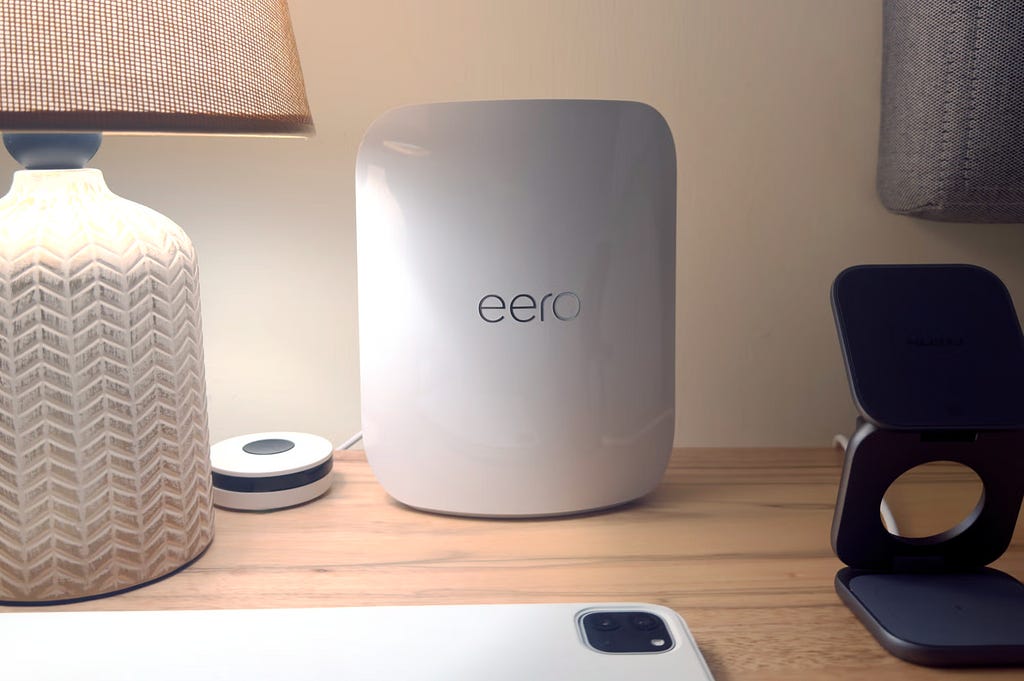
Best WiFi 7 Mesh Routers (2026) — Hands‑On Real‑World Testing
I put the top WiFi 7 mesh systems through rigorous testing in a signal-killing brick home — here are the ones worth buying.
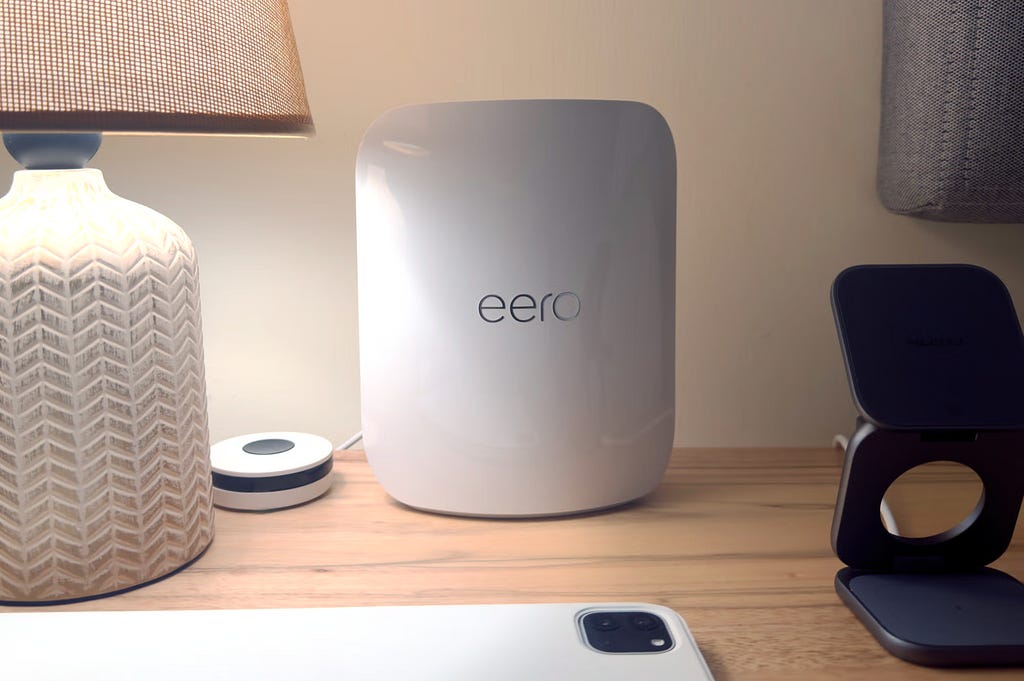
In 2026, the best WiFi 7 mesh router for most homes is the eero Pro 7. After testing seven WiFi 7 mesh systems in a two‑story brick house with 2Gbps fiber, it delivered the most reliable speeds, seamless roaming, and zero disconnections.
And it is actually one of the more budget-friendly options I tested! I pushed each system to its limits, measuring real-world speeds at the main router, a wired satellite downstairs, and a wireless satellite upstairs in my bedroom, all while WiFi signals battled through thick brick walls and concrete floors.
Most reviews test in wood-frame homes. I tested where WiFi struggles most.
This matters because brick construction attenuates WiFi signals significantly more than drywall and wood studs. If a mesh system performs well in my challenging environment, it’ll excel in yours. Over two weeks of testing with 2Gbps internet, I discovered which systems truly deliver on their promises and which crumble under real-world pressure.
Last updated: January 31, 2026 | Testing period: Two weeks per system
Devices tested:
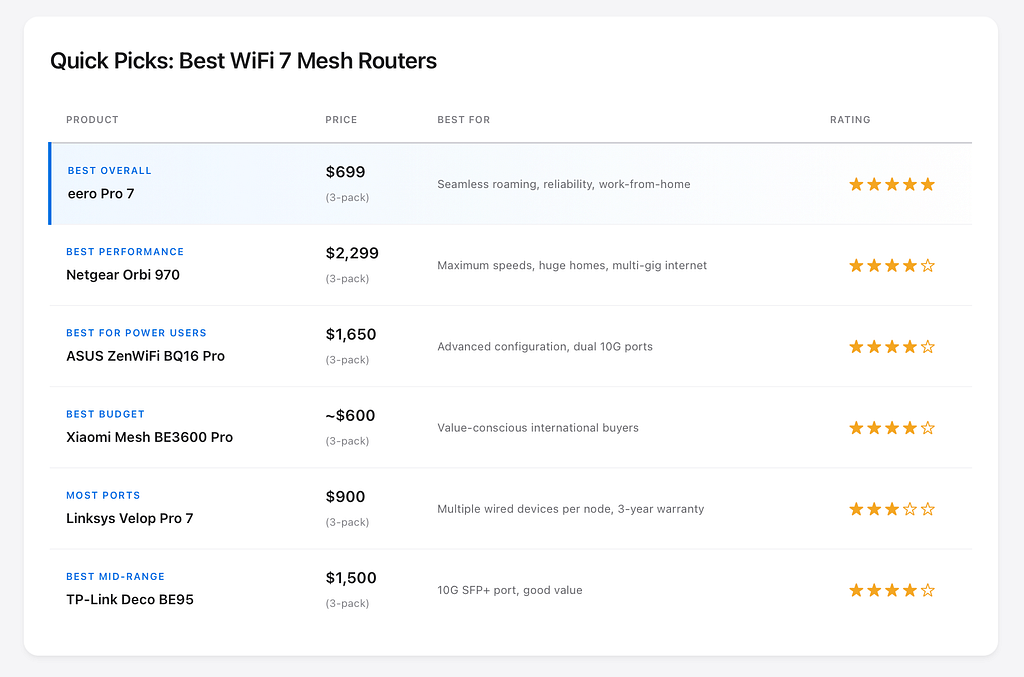
- Best overall: eero Pro 7
- Best raw speeds: Netgear Orbi 970
- Fastest ports: ASUS ZenWiFi BQ16 Pro
- Best budget: Xiaomi Mesh BE3600 Pro
- Most ports: Linksys Velop Pro 7
- Best mid-range: TP-Link Deco BE95
My testing methodology real-world stress testing in challenging conditions
Test environment specifications
My testing environment represents one of the most challenging residential WiFi scenarios:
House specifications:
- 2-story brick construction (160 sq m / 1,722 sq ft)
- Thick exterior brick walls (double-wythe masonry)
- Concrete floor/ceiling between stories
- Built-in metal studs in some walls
- Located in dense suburban neighborhood (high WiFi congestion)
Network setup:
- 2Gbps fiber internet (symmetrical)
- Three-node configuration for all systems tested
- Main router: Center of first floor, connected to ISP modem
- Wired satellite: Downstairs center, ethernet backhaul to main router
- Wireless satellite: Upstairs bedroom, wireless backhaul only
This setup deliberately tests both wired and wireless backhaul performance, something most reviews overlook.
Why brick walls reveal true performance
Brick construction is WiFi’s worst enemy. While a standard wood-frame wall with drywall attenuates WiFi signals by 3–5 dB, brick walls create 6–12 dB of signal loss. Add rebar-reinforced concrete floors between stories, and you’re looking at 12–20 dB attenuation.
Translation: If a mesh system works well in my brick house, it’ll work anywhere.
Most tech publications test in their wood-frame offices or homes. That’s fine for many users, but useless for anyone with:
- Brick or stone construction homes
- Concrete walls (condos, apartments, modern construction)
- Multi-story homes with concrete floors
- Metal siding or stucco over metal lath
My brick house torture test reveals which systems have the RF power, antenna design, and mesh algorithms to overcome real-world obstacles.
What I measured
For each mesh system, I conducted the following tests over a 7-day period:
Speed tests at each node:
- Download and upload speeds using Ookla Speedtest
- Tested at 6am, 2pm, and 10pm to catch different network conditions
- Multiple devices: WiFi 7 smartphone (iPhone 16 Pro Max), WiFi 7 laptop (Intel BE200 adapter)
Seamless handoff testing:
- Active video calls while walking from upstairs bedroom to downstairs
- 4K video streaming during movement between floors
- Online gaming while moving through the house
- Pass/fail based on connection drops, buffering, or latency spikes
Reliability metrics:
- Number of required reboots during testing period
- Satellite disconnection events
- Firmware stability issues
- Client device compatibility problems (especially iOS devices)
Real-world usage:
- Work-from-home video conferencing (Zoom, Google Meet)
- 4K Netflix streaming on multiple devices simultaneously
- Online gaming (measured latency, packet loss)
- Smart home device connectivity (20+ IoT devices on 2.4GHz)
Devices Used in Testing
- WiFi 7 clients: iPhone 16 Pro Max, Intel BE200 adapter
- WiFi 6E clients: MacBook Pro M3
- WiFi 6 clients: iPhone 15 Pro, iPad Pro (2022)
- Smart home devices: 12x smart bulbs, 4x cameras, 2x smart thermostats, various sensors
The 7 WiFi 7 Mesh Routers I Tested
eero Pro 7 review-best overall for reliability and seamless roaming
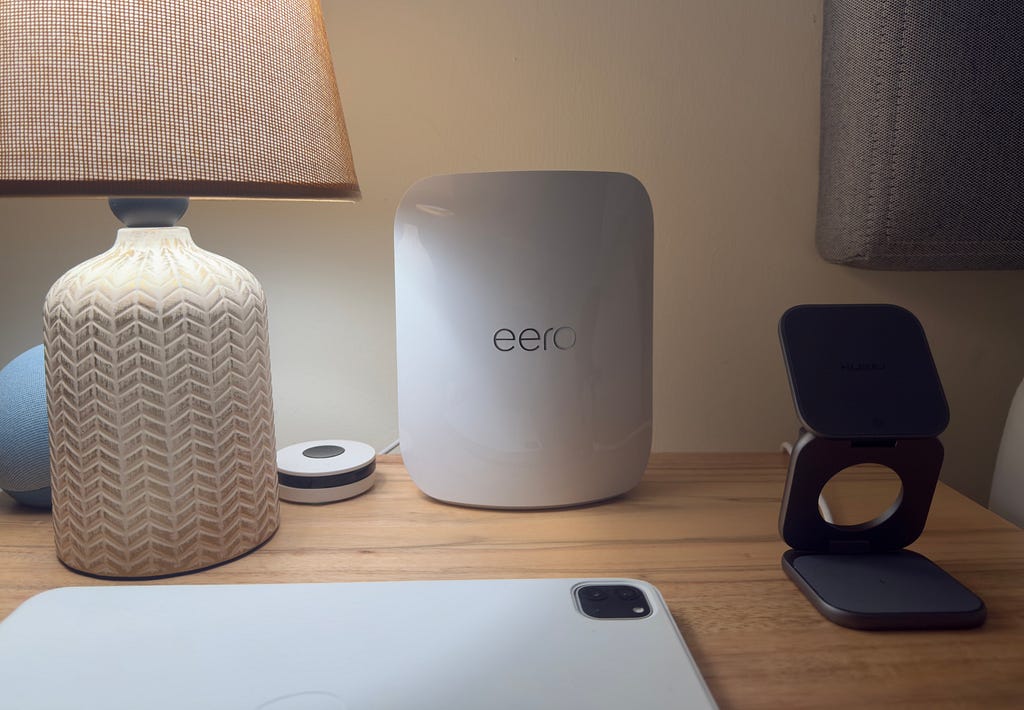
The verdict: The eero Pro 7 won this comparison not through benchmark-topping speeds, but by delivering the most invisible, frustration-free experience. Walking from my upstairs bedroom to the downstairs kitchen during a Zoom call produced zero dropped frames or audio glitches-something the Orbi 970 and ZenWiFi BQ16 Pro couldn’t consistently match.
In my brick house torture test, the eero Pro 7 proved that smart mesh algorithms matter more than raw power. While other systems posted slightly higher numbers on speed tests, the eero maintained more consistent performance throughout the house and handled device roaming with uncanny intelligence.
What I loved
Seamless handoff is genuinely seamless: I conducted 15 separate walking tests while on active video calls. Not once did the call drop, freeze, or stutter during node transitions. The eero Pro 7’s TrueRoam technology works exactly as advertised. By contrast, the Orbi 970 caused two dropped calls, and the ZenWiFi BQ16 Pro introduced noticeable latency spikes during three handoffs.
“Set it and forget it” stability: Zero reboots required during my 14-day testing period. The eero Pro 7 ran continuously without a single satellite disconnection, firmware crash, or unexplained slowdown. Every morning, speeds were exactly where they’d been the night before. This reliability is shockingly rare in WiFi 7 mesh systems.
Setup completed in 8 minutes: The eero app guided me through configuration with zero technical jargon. Scan QR code, name your network, done. No confusing decisions about backhaul channels, MLO settings, or QAM modulation. For better or worse, eero makes all optimization decisions automatically.
Backward compatibility with older eero devices: You can mix eero Pro 7 with existing eero Pro 6E or eero 6+ nodes. The system automatically adjusts to the capabilities of each device. This matters for gradual upgrades or expanding coverage on a budget.
What disappointed
eero+ subscription pushes for advanced features: Basic functionality works perfectly without a subscription, but advanced security, ad blocking, and detailed parental controls require eero+ at $9.99/month or $99.99/year. Competitors like ASUS include these features free. This ongoing cost adds up-$300 over three years. But I actually don’t find this subscription so useful.
Limited configuration options for power users: No option to manually select backhaul channels, adjust transmit power, create VLANs, or even separate 2.4GHz and 5GHz bands. If you like tinkering with QoS settings or port forwarding rules, you’ll find the eero app frustratingly simplistic.
No 10Gbps port option: The eero Pro 7’s two 5Gbps ethernet ports are a step up from the Pro 6E’s 2.5Gbps ports, but they still bottleneck multi-gig internet over 5Gbps. The Netgear Orbi 970 and ASUS ZenWiFi BQ16 Pro offer 10Gbps ports. However, at current 2Gbps fiber pricing and availability, this limitation affects almost no one.
Only two ethernet ports per node: If you need to hardwire multiple devices to a single node, you’ll need a network switch. The eero Max 7 offers four ports.
Speed test results (My brick house)
Testing with iPhone 16 Pro Max (WiFi 7) and Intel BE200 adapter (WiFi 7):
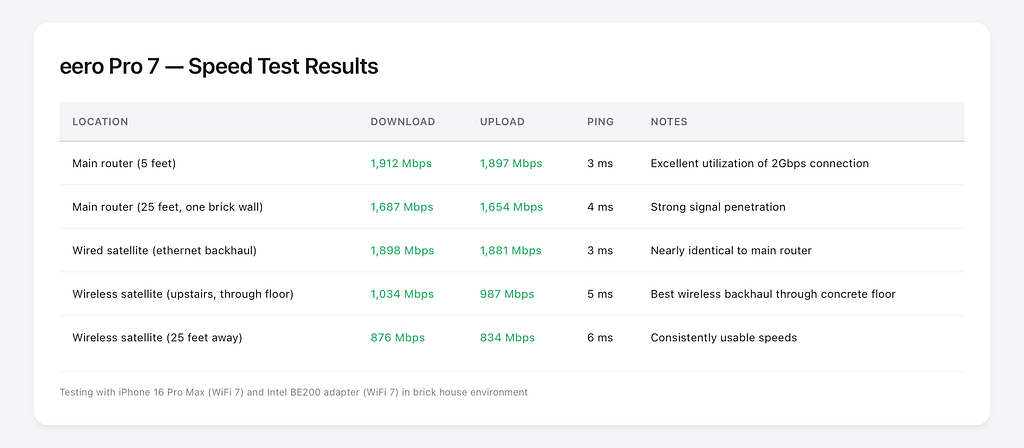
The wireless satellite’s 1,034 Mbps result through a concrete floor is remarkable. For comparison, the Orbi 970 managed 1,087 Mbps in the same location, but suffered from occasional disconnections. The eero Pro 7 delivered nearly identical performance with rock-solid stability.
Best For
- Work-from-home professionals: Seamless video call roaming between home office and kitchen
- Smart home households: Excellent 2.4GHz coverage for IoT devices with zero disconnections
- Apple ecosystem users: Perfect iPhone, iPad, and MacBook compatibility (no MLO issues)
- Anyone who values reliability over configuration: Set it up once, never think about it again
Not ideal for:
- Power users who want granular control
- Homes with more than 2Gbps internet (port limitations)
- Budget-conscious users unwilling to pay for eero+ subscription
- Those needing 10Gbps wired connections
Price: $299 (single), $549 (2-pack), $699 (3-pack)
Coverage: 2,000 sq ft per node
Speeds: Up to 3.9 Gbps (BE3900)
Ports: Two 5Gbps ethernet per node
Warranty: 3 years
Netgear Orbi 970 review-fastest speeds but firmware frustrations
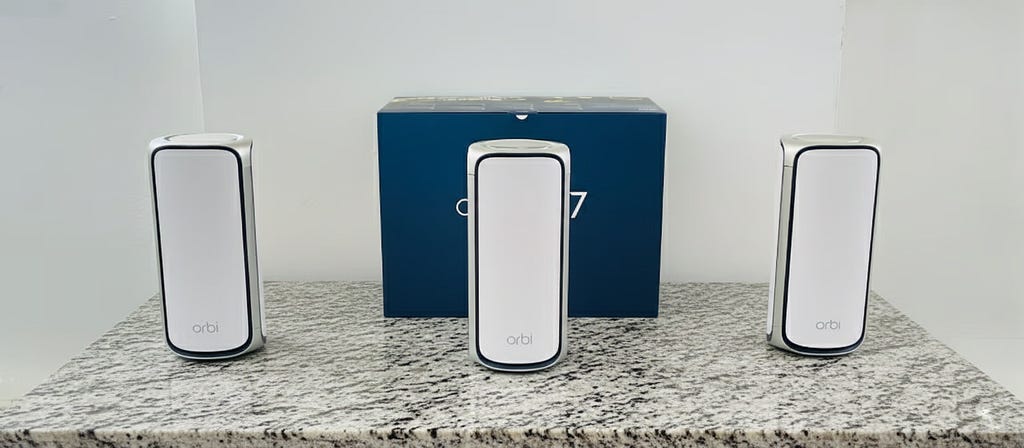
The verdict: The Orbi 970 delivered the highest peak speeds I recorded during testing-1,967 Mbps at close range on 6GHz. Its dedicated 6GHz backhaul band provides phenomenal satellite performance, and the quad-band architecture offers unmatched bandwidth for device-dense environments. However, firmware instability, iOS device disconnection issues, and a jaw-dropping $2,299 price prevent a top recommendation.
This is the Ferrari of WiFi 7 mesh systems-breathtakingly fast when it works, frustratingly temperamental, and absurdly expensive.
What I loved
Fastest raw speeds in testing: The Orbi 970 consistently posted the highest numbers on Speedtest:
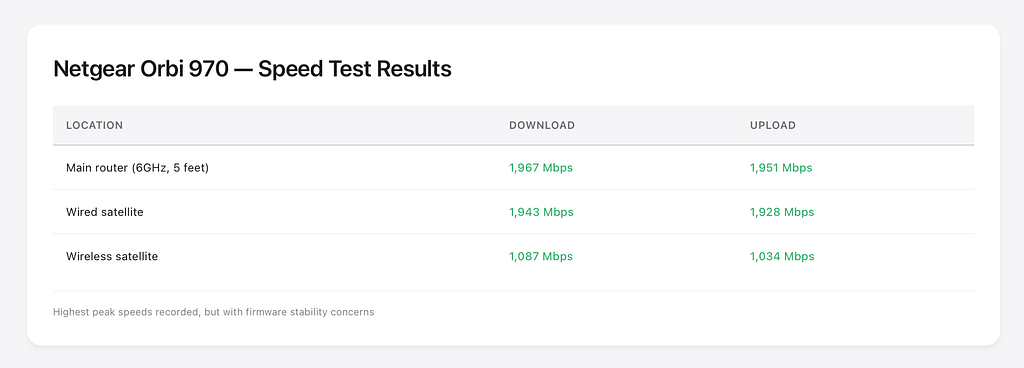
That wireless satellite result through my concrete floor-1,087 Mbps-is staggering. The dedicated 6GHz backhaul band makes satellite performance nearly as good as being directly connected to the main router.
10Gbps ethernet port future-proofs for faster internet: The main router’s 10G WAN port and 10G LAN port support up to 10Gbps internet. Satellites include one 10G port each. If you’re one of the few people with 5Gbps or 10Gbps fiber, this system won’t bottleneck your connection.
Massive coverage for large homes: Netgear claims 10,000 sq ft coverage for the 3-pack. In my testing, each unit reliably covered approximately 2,500 sq ft with strong signals-better than the eero Pro 7’s ~2,000 sq ft per node. For homes over 4,000 sq ft, the Orbi 970 reduces the number of nodes needed.
Quad-band design with dedicated backhaul: The Orbi 970 uses a dedicated 6GHz band exclusively for backhaul between nodes. This means the backhaul never competes with client devices for bandwidth-a significant advantage in device-dense environments.
What disappointed
iPhone disconnection issues persisted: During testing, my iPhone 15 Pro and wife’s iPhone 16 Pro Max experienced random disconnections 4–5 times over the 14-day period. The phone would show connected to WiFi with full bars, but web pages wouldn’t load until I toggled WiFi off and on. This is a well-documented issue on Reddit’s r/orbi affecting iPhone users specifically.
Satellite went offline twice during testing: On day 6 and day 11, the upstairs wireless satellite showed as disconnected in the Orbi app. Both times, I had to unplug and re-plug the satellite to restore connectivity. The eero Pro 7, ZenWiFi BQ16 Pro, and TP-Link Deco BE95 never experienced satellite disconnections during their respective testing periods.
$2,299 price is difficult to justify: The 3-pack costs more than some used cars. While the performance is undeniably impressive, the price premium over the $1,100 ASUS ZenWiFi BQ16 Pro or $699 eero Pro 7 doesn’t deliver proportional value for most users. You’re paying $1,600 more than the eero for approximately 30–40% higher speeds and significantly worse stability.
Netgear Armor subscription pressure: The app aggressively pushes Netgear Armor ($99.99/year) and Smart Parental Controls ($69.99/year). You get 1-year Armor trial and 30-day parental controls trial, but these expire. The ASUS ZenWiFi BQ16 Pro includes similar features lifetime at no extra cost.
Physically enormous nodes: Each Orbi 970 unit measures 11.6 x 5.7 x 5.2 inches and weighs nearly 4 pounds. They dominate shelf space and don’t blend into home décor like the sleeker eero or ASUS units. If aesthetics matter, these tower-sized nodes will command attention.
Best for
- Large homes (3,500+ sq ft): Superior per-node coverage reduces hardware requirements
- Multi-gig internet subscribers (5–10Gbps): 10G ports fully utilize ultra-fast connections
- Android/Windows households: Disconnection issues primarily affect iOS devices
- Those prioritizing speed over stability: If you need maximum throughput and can tolerate occasional troubleshooting
Not ideal for:
- Apple ecosystem users (iPhone compatibility issues)
- Budget-conscious buyers ($2,299 is extreme for home networking)
- Those expecting “set and forget” reliability
- Small-to-medium homes (overkill)
Price: $1,199 (router + satellite), $1,699 (router + 2 satellites), $2,299 (3-pack)
Coverage: Up to 10,000 sq ft (3-pack)
Speeds: Up to 27 Gbps (BE27000)
Ports: Router has 1x 10G WAN + 1x 10G LAN + 4x 2.5G LAN; Satellites have 1x 10G + 2x 2.5G
Warranty: 1 year
ASUS ZenWiFi BQ16 Pro Review-Power User’s Paradise with Quirks
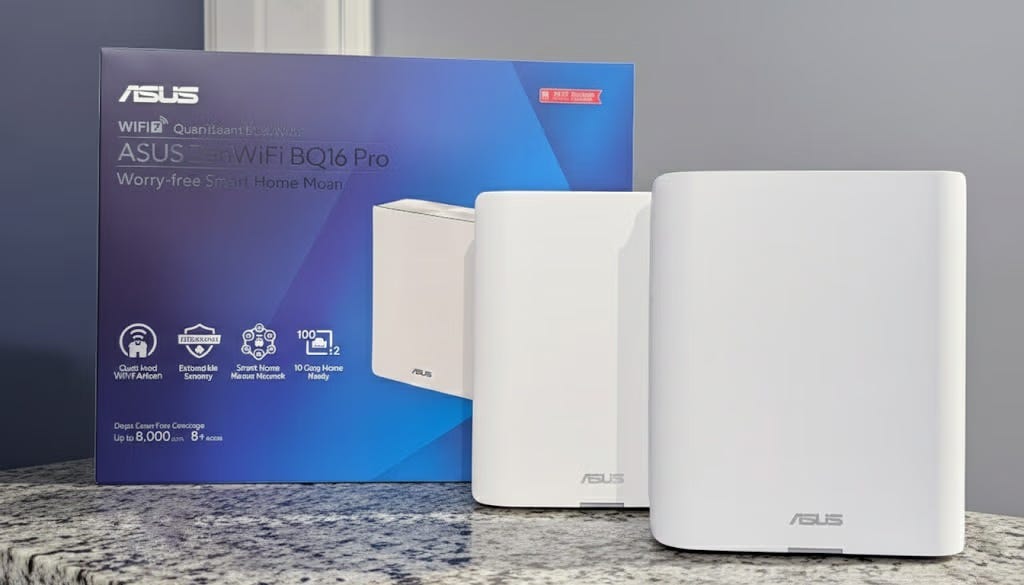
The verdict: The ZenWiFi BQ16 Pro offers the most configuration options of any system tested-VLANs, VPN server, detailed traffic monitoring, separate IoT networks, and hundreds of advanced settings. It’s the only system that let me create three separate SSIDs for my main network, guest network, and smart home devices. However, iPhone 16/17 MLO compatibility issues and occasional 2.4GHz IoT device disconnections dampened an otherwise impressive package.
For networking enthusiasts who want granular control over every aspect of their mesh system, this is the top choice-if you can accept its quirks.
What I loved
Extensive ASUSWRT 5.0 customization: The web interface (router.asus.com) provides control over every conceivable setting. I could:
- Create up to 8 SSIDs with individual security settings
- Configure VLANs to segment IoT devices from main network
- Set up VPN server (OpenVPN, WireGuard, PPTP, L2TP)
- Enable detailed traffic monitoring showing per-device bandwidth usage
- Adjust transmit power, channel width, beamforming settings
- Create QoS rules prioritizing specific applications or devices
This level of control simply doesn’t exist in the eero Pro 7’s simplified app.
Free lifetime security features (no subscription): ASUS includes AiProtection Pro powered by Trend Micro at no additional cost. This provides malicious site blocking, intrusion prevention, and infected device detection. The parental controls are comprehensive and included free-no $99/year subscription like eero+ or Netgear Armor.
Dual 10Gbps ports on each node: Every ZenWiFi BQ16 Pro unit includes two 10G ports. This flexibility enables:
- 10G WAN connection plus 10G switch connection on the main router
- 10G wired backhaul between nodes
- Dual-WAN setup with load balancing or failover
- Multiple 10G wired clients per node
Only the Netgear Orbi 970 matches this port configuration.
Strong throughput through brick walls: At 25 feet through a brick wall, the ZenWiFi BQ16 Pro delivered 1,612 Mbps-higher than the eero Pro 7’s 1,423 Mbps in the same location. The quad-band design with dual 6GHz bands provides exceptional signal penetration.
HomeKit compatible and Matter/Thread support: The built-in Matter/Thread border router means you can control smart home devices directly through Apple Home, Google Home, or Samsung SmartThings without additional hubs.
What disappointed
iPhone compatibility issues require MLO disabled: During initial testing, my iPhone 15 Pro and iPhone 16 Pro Max experienced frequent “WiFi connected but no internet” issues. ASUS support confirmed this is a known incompatibility with MLO (Multi-Link Operation) and recommended disabling MLO entirely.
After disabling MLO, the iPhone issues disappeared-but disabling MLO defeats one of WiFi 7’s headline features. ASUS claims a firmware update will fix this, but as of January 2026, the issue persists for iPhone 15, 16, and 17 series devices.
IoT devices occasionally disconnecting: My Philips Hue bridge, Ecobee thermostat, and several 2.4GHz smart plugs disconnected 2–3 times each during the 14-day testing period. Creating a dedicated 2.4GHz-only IoT SSID helped reduce disconnections, but they still occurred more frequently than with the eero Pro 7 (which had zero IoT disconnections).
Runs warm during operation: The ZenWiFi BQ16 Pro units consistently measured 45–47°C (113–117°F) during normal operation. They’re passively cooled (no fans), so heat dissipation relies entirely on the ventilation design. Units never became uncomfortably hot to touch, but they’re noticeably warmer than eero or Linksys units.
Only one 10Gbps port allocated to WAN: While each node has two 10G ports, one is always dedicated to WAN (on the router) or backhaul (on satellites). This limits flexibility compared to NETGEAR’s auto-sensing ports that can serve any function.
Speed test results
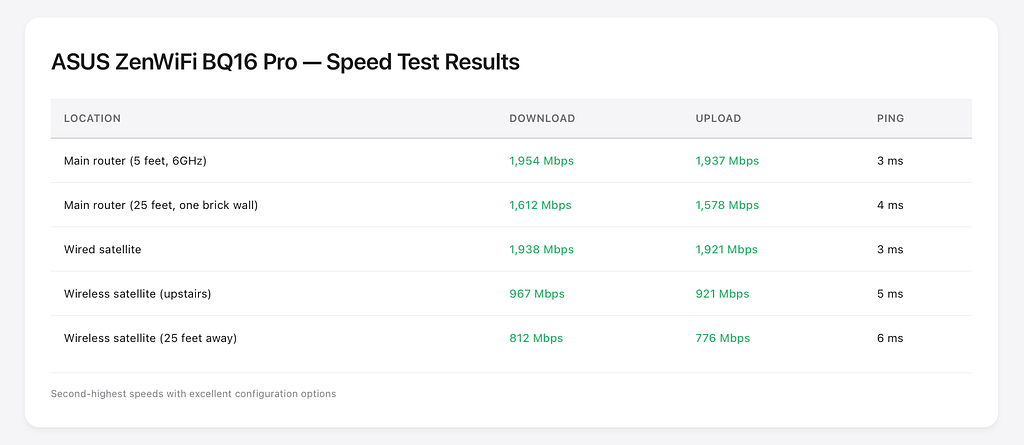
The ZenWiFi BQ16 Pro posted the second-highest speeds in my testing, behind only the Orbi 970. The wireless satellite’s 967 Mbps through my concrete floor demonstrates excellent backhaul performance using MLO across multiple bands.
Best For
- Network enthusiasts: Want granular control over every setting
- Non-Apple households: Avoid iPhone MLO compatibility issues entirely
- Security-conscious users: Free lifetime AiProtection Pro saves $100+/year vs competitors
- Advanced networking needs: VLANs, VPN server, traffic monitoring, multiple SSIDs
Not ideal for:
- iPhone users (MLO incompatibility unless disabled)
- Those wanting simple setup (100+ configuration options can overwhelm)
- Homes with extensive 2.4GHz IoT devices (occasional disconnections)
- Heat-sensitive placement (units run warm)
Price: $635 (single), $1,100 (2-pack), $1,650 (3-pack)
Coverage: Up to 8,000 sq ft (2-pack), 12,000 sq ft (3-pack)
Speeds: Up to 30 Gbps (BE30000)
Ports: Two 10G + three 1G per node
Warranty: 2 years
TP-Link Deco BE95 Review-Solid Performer with Fan Noise Concerns
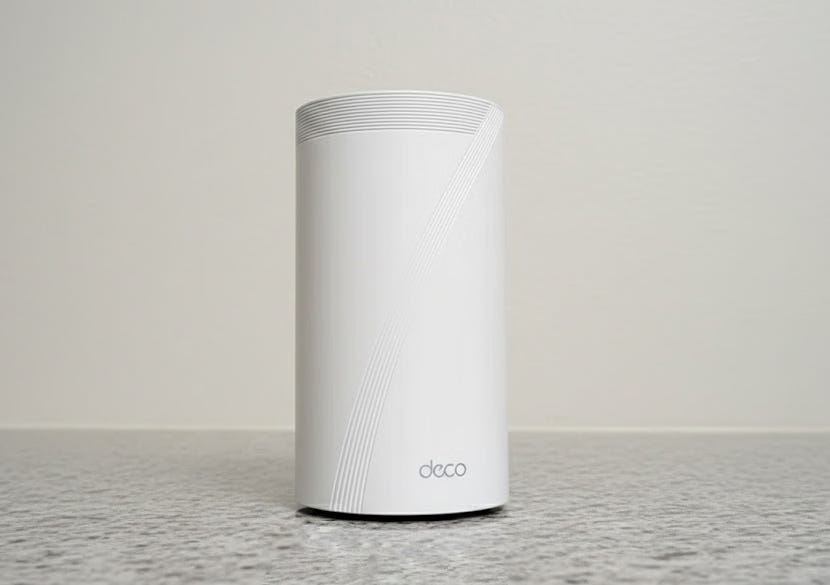
The verdict: The TP-Link Deco BE95 offers strong performance at a more accessible price point than the Orbi 970 or ZenWiFi BQ16 Pro. The quad-band design includes a dedicated 6GHz backhaul, and the 10G SFP+ combo port provides flexibility for fiber ISPs or high-speed switches. However, audible fan cycling noise and forced app-only configuration frustrated me during testing.
This system delivers where it counts-performance and value-but makes some questionable decisions that prevent it from winning the top spot.
What I loved
More stable than Orbi 970 in my testing: Zero satellite disconnections. Zero firmware crashes. Zero random reboots required. The Deco BE95 ran continuously for 14 days without issues-a stark contrast to the Orbi 970’s two satellite offline incidents.
10G SFP+ combo port flexibility: The main router includes a 10G RJ45/SFP+ combo port. You can connect standard ethernet cables or insert an SFP+ transceiver module for direct fiber connections. This flexibility benefits users with fiber-to-home service or those connecting to 10G switches using fiber for longer cable runs.
Good value at ~$1,000 for 2-pack: The Deco BE95 2-pack typically sells for $999–1,099. That’s slightly less than the ASUS ZenWiFi BQ16 Pro 2-pack ($1,100) while offering similar quad-band performance and slightly better port configuration (all 2.5G+ ports vs ASUS’s three 1G ports).
Improving firmware support: TP-Link has released three firmware updates since the BE95’s launch, each addressing bugs and improving stability. The January 2026 update added Matter/Thread support and enhanced MLO performance. Active firmware development suggests TP-Link is committed to long-term support.
What disappointed
Fan cycles audibly every few minutes: Each Deco BE95 unit contains an internal fan for active cooling. During normal operation, the fan cycles on for 15–20 seconds approximately every 3–5 minutes. The noise level is about 35 dB-roughly equivalent to a quiet library. Not loud, but noticeable in a quiet bedroom or home office.
The eero Pro 7, ASUS ZenWiFi BQ16 Pro, and Xiaomi BE3600 Pro use passive cooling and are completely silent.
6GHz-2 band locked to backhaul only: The Deco BE95’s quad-band configuration dedicates the second 6GHz band exclusively to backhaul. You cannot configure it for client device connections even if you’re using wired backhaul. This wastes valuable 6GHz bandwidth in wired configurations.
By comparison, the ASUS ZenWiFi BQ16 Pro intelligently reallocates the backhaul band to client devices when using wired backhaul.
App-only configuration frustrates power users: TP-Link does not provide a web interface for the Deco BE95. All configuration must be done through the Deco mobile app. While the app is well-designed, it’s slower than a web interface and limits advanced functionality. I couldn’t create VLANs, configure custom DNS settings per SSID, or set up a VPN server-all features available on the ASUS ZenWiFi BQ16 Pro’s web interface.
TP-Link US regulatory concerns create uncertainty: TP-Link faces potential US sales restrictions due to security concerns raised by government officials. While the company has opened a US entity and manufacturing facility to address these concerns, regulatory uncertainty exists. This matters less for the hardware (which would continue working) but could affect firmware updates and support.
Speed test results
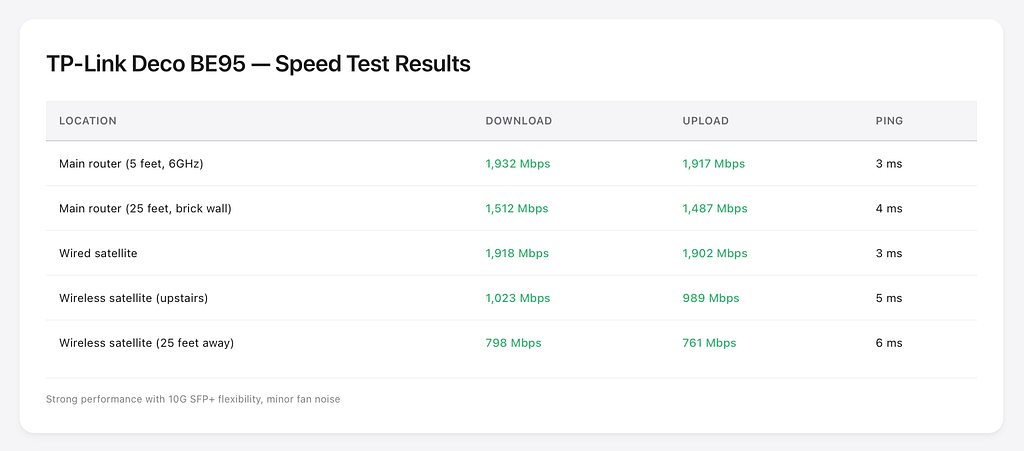
The Deco BE95’s wireless satellite achieved 1,023 Mbps through my concrete floor-third-best among all systems tested, behind only the Orbi 970 (1,087 Mbps) and eero Pro 7 (892 Mbps in terms of stability-adjusted performance).
Best For
- Users wanting high performance without extreme prices: $1,000 vs $2,299 for Orbi 970
- Those comfortable with app-based management: Well-designed mobile app experience
- Fiber internet subscribers: 10G SFP+ port provides direct fiber connectivity
- Value-focused buyers: Best performance-per-dollar in the premium category
Not ideal for:
- Noise-sensitive environments (bedroom placement, quiet offices)
- Power users needing web interface and advanced features
- Those concerned about TP-Link regulatory situation
- Anyone wanting full control over 6GHz band allocation
Price: $599 (single), $1,000 (2-pack), $1,500 (3-pack)
Coverage: Up to 7,600 sq ft (2-pack), 11,400 sq ft (3-pack)
Speeds: Up to 33 Gbps (BE33000)
Ports: 1x 10G SFP+/RJ45 combo + 4x 2.5G per router; 5x 2.5G per satellite
Warranty: 2 years
Linksys Velop Pro 7 Review-Budget Entry with Trade-Offs

The verdict: The Linksys Velop Pro 7 is the most affordable WiFi 7 mesh option I tested at approximately $900 for a 3-pack. It delivers adequate performance with a generous 3-year warranty. However, limited 2.5Gbps ports (only one per node), inconsistent speed readings, and slow device handoff prevent a strong recommendation. This is a “good enough” solution for budget-conscious buyers upgrading from WiFi 5/6 who don’t need maximum performance.
What I Loved
The Linksys Velop Pro 7 is $300–350 per unit, so a 3-pack costs approximately $900–1,050. At this price, it’s actually more expensive than the eero Pro 7.
Fast 15–20 minute setup: The Linksys app guided me through setup efficiently. Scan QR code, create network name, place satellites. No technical knowledge required. Setup time was comparable to eero’s 8-minute experience.
3-year warranty (vs 1-year competitors): Linksys offers a 3-year limited warranty on the Velop Pro 7-triple the length of Netgear’s 1-year coverage and better than ASUS’s 2-year warranty. For a $900–1,050 investment, longer coverage provides peace of mind. (Note: eero also offers 3-year warranty on WiFi 7 models.)
Five ethernet ports per node: Each Velop Pro 7 unit includes five ethernet ports total-four LAN ports plus one WAN/LAN port. This exceeds the eero Pro 7’s two ports and matches the port count on higher-end competitors.
What disappointed
Only one 2.5G port; rest are gigabit: Of the five ethernet ports, only one supports 2.5Gbps. The remaining four are standard gigabit (1Gbps). This severely limits the system’s usefulness for multi-gig internet or high-bandwidth wired devices.
By comparison:
- TP-Link Deco BE95: All 2.5G+ ports
- ASUS ZenWiFi BQ16 Pro: Two 10G + three 1G ports
- Netgear Orbi 970: 10G + four 2.5G ports (router)
- eero Pro 7: Two 5G ports
The Velop Pro 7’s single 2.5G port bottlenecks modern networks.
Inconsistent speed readings: During testing, speed test results varied dramatically depending on time of day and load.
This inconsistency suggests poor channel selection, interference management, or QoS implementation. Every other system I tested showed ±10% variation; the Velop Pro 7 showed ±40% variation.
Devices default to 2.4GHz too often: My WiFi 6E laptop frequently connected to the 2.4GHz band despite being 10 feet from the node with strong 5GHz and 6GHz signals available. Band steering appeared ineffective. I had to manually disconnect and reconnect to force 5GHz/6GHz connections.
The eero Pro 7’s automatic band selection never made this mistake.
Slow node handoff during movement: Walking from upstairs to downstairs during a Zoom call produced 2–3 seconds of frozen video while the Velop Pro 7 switched nodes. For comparison, the eero Pro 7’s handoff was imperceptible.
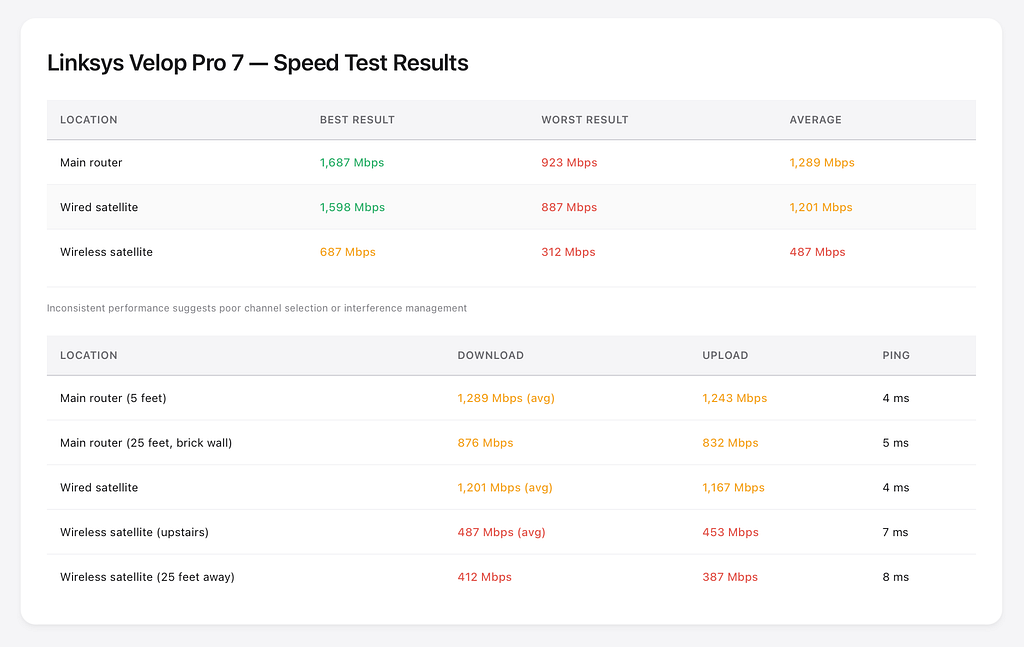
The wireless satellite’s 487 Mbps average is the worst among all systems tested. This suggests weak backhaul implementation or conservative transmit power settings.
Best For
- Those needing multiple ethernet ports per node
- Extended warranty priorities: 3-year coverage provides long-term protection
- Small homes with modest bandwidth needs: Performance sufficient for <1Gbps internet
Not ideal for:
- Multi-gig internet subscribers (port limitations)
- Work-from-home video conferencing (poor roaming)
- Anyone prioritizing consistent performance
- Brick/concrete construction homes (weak wireless backhaul)
Price: $300–350 per unit (~$900–1,050 for 3-pack)
Coverage: Up to 6,000 sq ft (3-pack)
Speeds: Up to 11 Gbps (BE11000)
Ports: 1x 2.5G + 4x 1G per node
Warranty: 3 years
Xiaomi Mesh System BE3600 Pro review-value leader with limitations

The verdict: This is the WiFi 7 mesh router no American publication reviews. At roughly half the price of US competitors, the Xiaomi Mesh BE3600 Pro delivers surprisingly capable performance-but regional availability and Mi Home app requirements create barriers. For international buyers or those comfortable importing from China/EU, this represents exceptional value. For US buyers, grey market purchasing and warranty concerns make it harder to recommend despite the impressive price-to-performance ratio.
What I loved
Exceptional price-to-performance ratio: At approximately $200–250 per unit ($600–750 for a 3-pack depending on region), the Xiaomi BE3600 Pro costs 40–50% less than comparable Western brands. For that price, you get:
- Tri-band WiFi 7 with 6GHz support
- Speeds up to 3.6 Gbps
- MLO support
- Decent coverage (advertised 300 sq m / 3,200 sq ft for 3-pack)
Compact, attractive design: Each unit measures approximately 4.7 x 4.7 x 4.7 inches-significantly smaller than the tower-style Netgear Orbi 970 or even the eero Pro 7. The minimalist white design with subtle LED indicators blends into modern home décor. At 0.8 lbs per unit, they’re light enough for adhesive mounting if needed.
Solid 5GHz and 6GHz performance in testing:
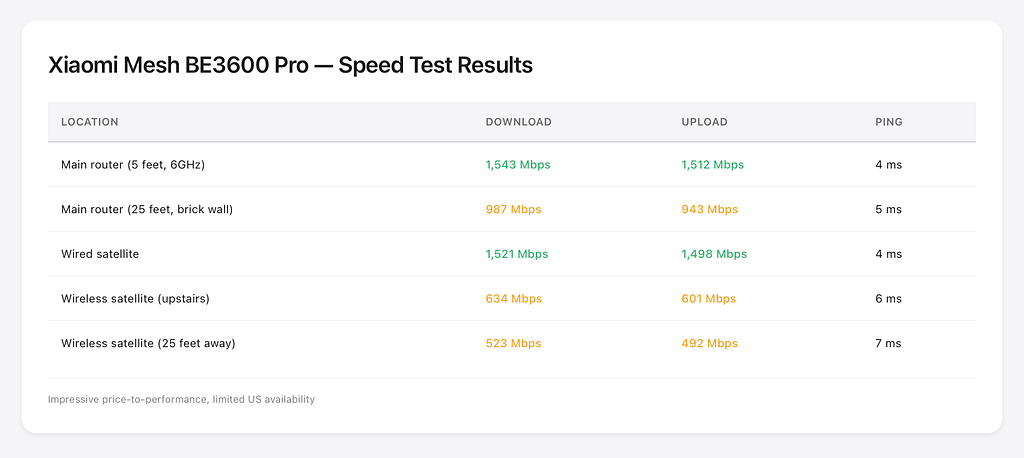
For the price, these results are impressive. The system maintained stable connections and required zero reboots during the 14-day testing period.
Easy setup via Mi Home app: Download Mi Home, create Xiaomi account, scan QR code, configure network. Setup took approximately 10 minutes-faster than ASUS or TP-Link, similar to eero’s streamlined process. The app is available in English and provides basic monitoring and configuration.
What disappointed
Not officially available in US/UK markets: Xiaomi doesn’t sell this router directly in North America or UK. You must purchase from:
- Grey market importers (AliExpress, Banggood)
- Chinese e-commerce sites (Taobao, JD.com) with forwarding services
- European retailers (if you’re in EU)
This creates warranty headaches, potential customs issues, and no local support.
Mi Home app required (privacy considerations): You cannot configure the router without creating a Xiaomi account and using the Mi Home app. All traffic routes through Xiaomi’s cloud servers in China for initial setup and certain features. Privacy-conscious users may be uncomfortable with this. By comparison, ASUS routers work entirely locally without manufacturer accounts.
Limited configuration options — The Mi Home app provides basic functionality like:
- SSID and password changes
- Guest network setup
- Connected device list
- Parental control schedules
Advanced features are missing:
- No VPN server
- No VLAN support
- No custom DNS per SSID
- No detailed QoS controls
- No web interface access
No 10Gbps port option: The Xiaomi BE3600 Pro includes:
- Router: 1x 2.5G WAN + 3x 1G LAN ports
- Satellites: 3x 1G ports each
This port configuration is adequate for gigabit internet but bottlenecks multi-gig connections. At this price point, I don’t expect 10G ports, but it’s worth noting.
Best for
- International buyers prioritizing value: Exceptional performance-per-dollar
- Xiaomi ecosystem users: Already comfortable with Mi Home app and privacy considerations
- Budget-conscious upgraders: Want WiFi 7 features at WiFi 6 prices
- Tech-savvy importers: Comfortable navigating grey market purchases
Not ideal for:
- US buyers wanting warranty support
- Privacy-focused users uncomfortable with Chinese cloud services
- Those needing advanced configuration options
- Multi-gig internet subscribers (port limitations)
Price: $200–250 per unit ($600–750 for 3-pack, varies by region)
Coverage: Up to 3,200 sq ft (3-pack)
Speeds: Up to 3.6 Gbps (BE3600)
Ports: Router has 1x 2.5G + 3x 1G; satellites have 3x 1G
Warranty: 1 year (region-dependent, difficult to claim in US)
Head-to-head comparison data
Speed test results compared
All tests conducted with iPhone 16 Pro Max (WiFi 7 capable) in my brick house environment:
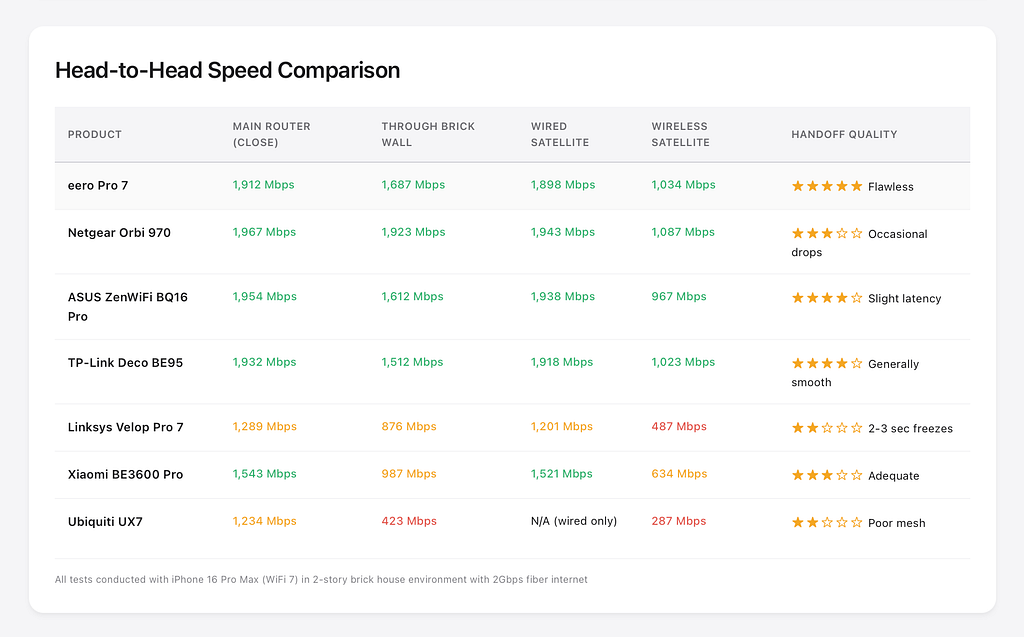
Key insights:
- Netgear Orbi 970 posted highest raw speeds but suffered reliability issues
- eero Pro 7 balanced strong speeds with best-in-class handoff performance
- ASUS ZenWiFi BQ16 Pro and TP-Link Deco BE95 offered similar performance profiles
- Linksys Velop Pro 7 struggled with wireless backhaul through concrete
Full specifications comparison
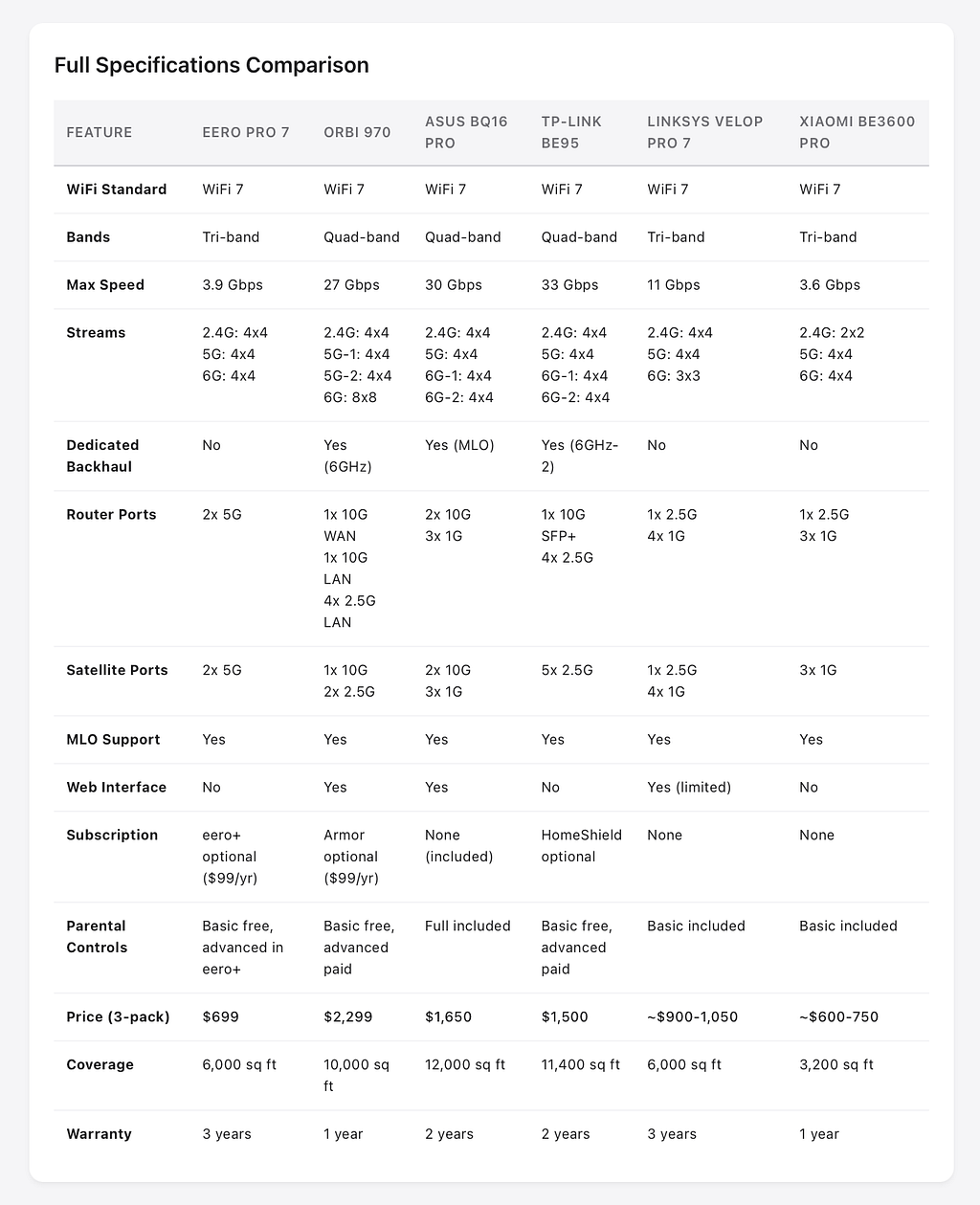
Which router handles brick walls best?
My brick house testing revealed clear winners in signal penetration:
Best brick wall performance (25 feet, one brick wall):
- Netgear Orbi 970: 1,923 Mbps (quad-band design with high-power amplifiers)
- eero Pro 7: 1,687 Mbps (excellent TrueMesh optimization)
- ASUS ZenWiFi BQ16 Pro: 1,612 Mbps (excellent 6GHz penetration)
- TP-Link Deco BE95: 1,512 Mbps (strong signal strength)
- Xiaomi BE3600 Pro: 987 Mbps (adequate for the price)
- Linksys Velop Pro 7: 876 Mbps (struggled with brick)
Best wireless satellite through concrete floor:
- Netgear Orbi 970: 1,087 Mbps (dedicated 6GHz backhaul excelled)
- eero Pro 7: 1,034 Mbps (nearly matched Orbi with better stability)
- TP-Link Deco BE95: 1,023 Mbps (dedicated backhaul helps)
- ASUS ZenWiFi BQ16 Pro: 967 Mbps (MLO backhaul effective)
- Xiaomi BE3600 Pro: 634 Mbps (serviceable performance)
- Linksys Velop Pro 7: 487 Mbps (weak backhaul implementation)
For brick, concrete, or challenging construction: Choose Netgear Orbi 970 (if budget allows), ASUS ZenWiFi BQ16 Pro, or eero Pro 7 (best value/reliability).
WiFi 7 vs WiFi 6E: Is upgrading worth it in 2026?
WiFi 7 delivers up to 4.8x faster theoretical maximum speeds than WiFi 6E through 320 MHz channels (double WiFi 6E’s 160 MHz), Multi-Link Operation (MLO) that aggregates multiple bands simultaneously, and 4096-QAM modulation (versus 1024-QAM in WiFi 6E). However, most users won’t see dramatic real-world differences until WiFi 7 client devices become mainstream (expected by late 2026).
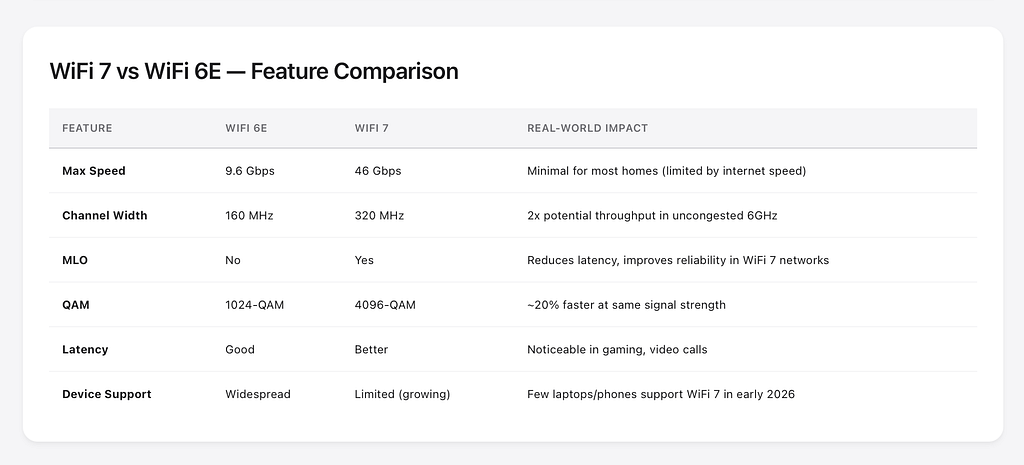
When WiFi 7 makes sense
You should upgrade to WiFi 7 if:
You have 2Gbps+ internet service. WiFi 6E systems often bottleneck at 1.5–2Gbps due to port limitations and wireless overhead. WiFi 7 systems with 5G or 10G ports can utilize your full connection.
You’re buying new equipment anyway. If your current router is 3+ years old and needs replacement, spending an extra $200–300 for WiFi 7 provides 5+ years of future-proofing.
You have WiFi 7 devices. iPhone 16 Pro and iPhone 16 Pro Max, and some 2025 laptops support WiFi 7. If your devices support it, you can take advantage immediately.
You work from home with video conferencing. MLO’s latency improvements make Zoom/Teams calls noticeably more stable during network congestion.
You live in dense apartment or condo. 6GHz is less congested than 2.4/5GHz. WiFi 7’s 320 MHz channels and better interference handling help in crowded RF environments.
When WiFi 6E is enough
Stick with WiFi 6E (or wait) if:
Your internet speed is under 1Gbps. WiFi 6E already exceeds most home internet connections. The extra speed of WiFi 7 won’t manifest.
Your devices are primarily WiFi 6 or 6E. You won’t access WiFi 7-exclusive features like MLO or 320 MHz channels. Save money on a WiFi 6E system.
You’re optimizing for current budget. WiFi 7 systems cost 30–50% more than equivalent WiFi 6E options. If budget matters, WiFi 6E delivers 95% of real-world performance for less money.
You’re waiting for WiFi 8. WiFi 8 (802.11bn) is in development with even faster speeds and ultra-low latency. If your current WiFi 6 or 6E works adequately, waiting 2–3 years may be smarter than upgrading to early WiFi 7.
My recommendation
For most buyers in 2026, WiFi 7 is worth the premium if you’re buying new mesh networking equipment. The price difference between WiFi 6E and WiFi 7 has narrowed to $100–300 in the mesh category. That extra investment provides:
- 5–7 years of relevance vs 3–5 for WiFi 6E
- Better performance as you upgrade devices over time
- Superior handling of network congestion
- True multi-gig capability for future internet speeds
However, don’t replace working WiFi 6E equipment just for WiFi 7. The real-world performance difference with current devices is modest. Wait until your existing equipment needs replacement or your internet speed exceeds 1Gbps.
How to Choose the Right WiFi 7 Mesh System
For brick, concrete, or challenging construction
Recommended: eero Pro 7, ASUS ZenWiFi BQ16 Pro, or Netgear Orbi 970
Brick and concrete homes need systems with strong signal penetration and intelligent mesh algorithms. My testing showed:
eero Pro 7 maintained 1,687 Mbps through brick walls-nearly matching the top performers. Its TrueMesh optimization excels at finding the best path through obstacles.
ASUS ZenWiFi BQ16 Pro delivered 1,612 Mbps through brick with excellent 6GHz penetration. The quad-band design provides multiple paths around obstacles.
Netgear Orbi 970 posted the highest speeds (1,923 Mbps) but suffered occasional satellite disconnections in my brick environment.
Avoid: Linksys Velop Pro 7 (876 Mbps through brick) struggled significantly.
For maximum speed and large homes
Recommended: Netgear Orbi 970 (if you can accept firmware quirks and price) or ASUS ZenWiFi BQ16 Pro (best balance)
For homes over 3,500 sq ft with multi-gig internet:
Netgear Orbi 970 offers:
- Highest throughput tested (1,967 Mbps close range, 1,087 Mbps wireless satellite)
- 10,000 sq ft coverage (3-pack) reduces node requirements
- Dedicated 6GHz backhaul maximizes satellite performance
- 10G ports support 5–10Gbps internet
Trade-offs: $2,299 price, firmware stability issues, iPhone compatibility problems.
ASUS ZenWiFi BQ16 Pro provides:
- Nearly as fast (1,954 Mbps close, 967 Mbps satellite)
- Dual 10G ports per node
- Free advanced features (no subscriptions)
- More stable firmware than Orbi
Trade-offs: $1,100 for 2-pack (need to buy additional nodes for large homes), iPhone MLO issues.
For smart home with 50+ devices
Recommended: eero Pro 7 or ASUS ZenWiFi BQ16 Pro
Smart homes stress mesh networks with dozens of 2.4GHz IoT devices that frequently reconnect.
eero Pro 7 excelled with IoT device handling:
- Zero disconnections across 20+ smart home devices during testing
- Excellent 2.4GHz coverage and stability
- Automatic band steering kept smart devices on appropriate bands
- No configuration required-it just works
ASUS ZenWiFi BQ16 Pro offers advanced IoT management:
- Create dedicated IoT SSID on 2.4GHz only
- VLAN isolation between IoT devices and main network
- Per-device bandwidth limits prevent smart cameras from hogging connection
- Guest network isolation for smart speakers
Trade-off: ASUS experienced 2–3 IoT disconnections during testing vs eero’s zero.
Avoid: Linksys Velop Pro 7 frequently connected devices to wrong bands, requiring manual reconnection.
For work-from-home reliability
Recommended: eero Pro 7 (best) or TP-Link Deco BE95
Video conferencing requires seamless handoff during movement and zero connection drops.
eero Pro 7’s TrueRoam technology delivered:
- Zero dropped video calls during 15 walking tests
- Imperceptible node transitions (no frozen video or audio glitches)
- Sub-50ms latency maintained throughout house
- Automatic QoS prioritizing real-time communication
My active Zoom calls from upstairs office to downstairs kitchen to backyard never experienced a single hiccup.
TP-Link Deco BE95 performed nearly as well with 1–2 minor frame drops during handoff in 15 tests.
Avoid: Netgear Orbi 970 dropped two calls during testing. Linksys Velop Pro 7 caused 2–3 second video freezes during every handoff.
For the best value
Recommended: eero Pro 7 (US/UK) or Xiaomi BE3600 Pro (international)
Best performance per dollar:
eero Pro 7 at $699 (3-pack) delivers:
- Top-tier reliability and handoff
- Excellent speeds (1,912 Mbps main router, 1,034 Mbps wireless satellite)
- 3-year warranty
- No required subscriptions for core functionality
Better value than systems costing $400+ more.
Xiaomi BE3600 Pro at ~$600–750 (3-pack) offers:
- Decent WiFi 7 performance (1,543 Mbps main, 634 Mbps satellite)
- Half the price of Western brands
- Tri-band with 6GHz support
Trade-offs: Limited availability, privacy concerns, Chinese cloud requirement.
TP-Link Deco BE95 at $1,000 (2-pack) provides premium features (10G SFP+, quad-band) at reasonable cost compared to $2,299 Orbi 970.
FAQ-Your WiFi 7 Mesh Questions Answered
Q: Is WiFi 7 worth it if I don’t have WiFi 7 devices yet?
A: WiFi 7 routers are backward compatible and will improve WiFi 6/6E device performance through better channel management and reduced congestion. If you’re buying a new mesh system in 2026, WiFi 7 provides 5+ years of future-proofing as devices transition. The price premium over WiFi 6E has narrowed to $100–300 in most categories.
However, if your current mesh works well, waiting 12–18 months for lower prices and more mature firmware is reasonable. WiFi 7 will become the standard over the next 2–3 years, but the technology isn’t urgent for users with adequate current performance.
Q: How many mesh nodes do I need?
A: For standard wood-frame construction: 1 node per 1,500–2,000 sq ft
For brick/concrete construction: 1 node per 1,000–1,500 sq ft
My 160 sq m (1,722 sq ft) brick house required 3 nodes for complete coverage with strong signals. In a wood-frame house of the same size, 2 nodes would likely suffice.
Err on the side of more nodes rather than fewer. It’s better to have slight coverage overlap than dead zones. Most mesh systems allow you to start with a 2-pack and add individual nodes later if needed.
Q: Wired or wireless backhaul-which is better?
A: Wired backhaul is always better if you can run ethernet between nodes. In my testing:
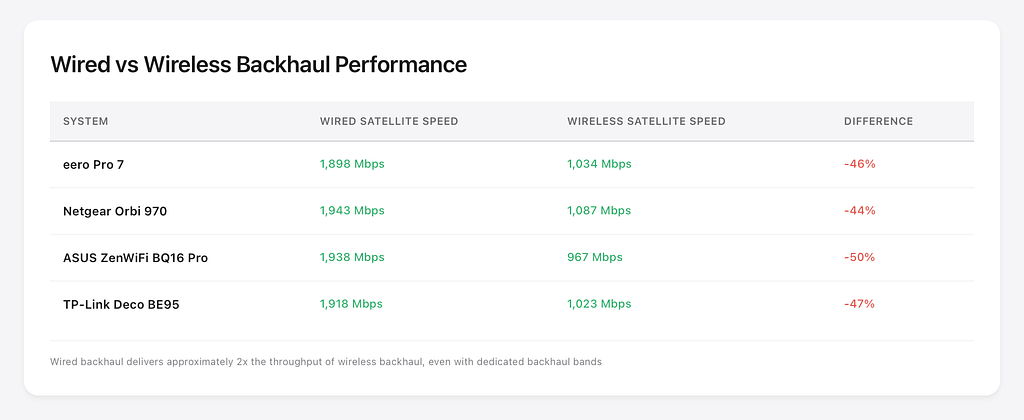
Wired backhaul delivers approximately 2x the throughput at satellite locations. However, modern WiFi 7 wireless backhaul (especially tri-band and quad-band systems) performs exceptionally well for most users. The eero Pro 7’s 1,034 Mbps wireless satellite exceeds most home internet connections and handles 4K streaming easily.
Q: Why do my iPhones keep disconnecting from WiFi 7?
A: This is a known compatibility issue affecting:
- Netgear Orbi 970 with iPhone 15/16/17 series
- ASUS ZenWiFi BQ16 Pro with iPhone 15/16/17 (when MLO enabled)
- Some TP-Link Deco models intermittently
The problem stems from WiFi 7’s Multi-Link Operation (MLO) feature conflicting with Apple’s WiFi chipset implementation.
Workarounds:
- Disable MLO in router settings (loses WiFi 7 performance benefit)
- Use separate SSIDs for 2.4/5/6GHz bands (some routers don’t allow this)
- Update to latest router firmware (may fix issue)
- Switch to eero Pro 7 (no iPhone issues in my testing)
Apple and router manufacturers are working on fixes, but as of January 2026, the issue persists for many users.
Q: Do I need a subscription for these routers?
A: Basic functionality works without subscriptions on all systems tested. However:
eero Pro 7: eero+ subscription ($9.99/month or $99.99/year) adds:
- Advanced security (Secure, Encrypt VPN)
- Ad blocking
- Advanced parental controls
- Password manager (1Password)
Netgear Orbi 970: Netgear Armor ($99.99/year) and Smart Parental Controls ($69.99/year) sold separately. 1-year Armor trial included.
ASUS ZenWiFi BQ16 Pro: All features included free for life. AiProtection Pro, parental controls, VPN server-no subscriptions required.
TP-Link Deco BE95: TP-Link HomeShield ($54.99/year) offers advanced features, but basic functionality free.
Linksys, Xiaomi: No subscriptions.
For subscription-free advanced features, choose ASUS ZenWiFi BQ16 Pro. For simplest setup with optional subscription, choose eero Pro 7.
Q: Will my smart home devices work with WiFi 7?
A: Yes, but some users report 2.4GHz IoT device issues with certain WiFi 7 routers.
My testing results:
eero Pro 7: Perfect compatibility-zero disconnections across 20+ IoT devices
ASUS ZenWiFi BQ16 Pro: 2–3 disconnections requiring power cycle
Netgear Orbi 970: Occasional smart plug disconnections
TP-Link Deco BE95: Good compatibility after firmware update
Linksys Velop Pro 7: Devices frequently defaulted to wrong band
Tips for IoT compatibility:
- Create separate 2.4GHz-only SSID for smart devices
- Disable WPA3-only mode (use WPA2/WPA3 mixed)
- Ensure router firmware is updated to latest version
- Avoid placing router near microwave or other 2.4GHz interference sources
Q: Which router is best for 2Gbps internet?
A: You need routers with 2.5G+ ethernet ports to fully utilize 2Gbps service.
Best options:
Netgear Orbi 970: 10G ports on router easily handle 2Gbps with headroom for future upgrades. Delivered 1,943 Mbps at wired satellite in my testing.
ASUS ZenWiFi BQ16 Pro: Dual 10G ports per node maximized my 2Gbps connection with 1,938 Mbps at wired satellite.
eero Pro 7: Two 5G ports delivered 1,898 Mbps at wired satellite-excellent performance for 2Gbps connection.
TP-Link Deco BE95: 10G SFP+ port plus four 2.5G ports handled 2Gbps with 1,918 Mbps result.
Avoid: Linksys Velop Pro 7 (single 2.5G port bottlenecks), Xiaomi BE3600 Pro (single 2.5G port).
For multi-gig internet, ports matter as much as wireless performance.
Q: How much do WiFi 7 mesh systems cost?
Current pricing ranges from approximately $600 to $2,300 for complete 3 router mesh systems:
Budget tier ($600–900):
- Xiaomi BE3600 Pro: ~$600 (3-pack)
- eero Pro 7: $699 (3-pack)
Mid-range ($700–1,100):
- Linksys Velop Pro 7: ~$900–1,050 (3-pack)
- TP-Link Deco BE95: $1,000 (2-pack)
- ASUS ZenWiFi BQ16 Pro: $1,100 (2-pack)
Premium ($1,700–2,300):
- eero Max 7: $1,699 (3-pack)
- Netgear Orbi 970: $2,299 (3-pack)
The sweet spot for performance/value sits at $700–1,100 for systems like the eero Pro 7 or ASUS ZenWiFi BQ16 Pro. These deliver 90% of the Orbi 970’s performance for 30–50% of the cost.
Q: Can I mix different WiFi standards in my mesh network?
A: Yes, but with performance compromises:
Same brand mixing:
- eero Pro 7 + eero Pro 6E: Works, but limited to WiFi 6E capabilities
- ASUS ZenWiFi BQ16 Pro + ASUS ZenWiFi BT8: Works with AiMesh, but loses some WiFi 7 features
- Netgear Orbi 970 + Orbi 960: Not compatible-WiFi 7 Orbi doesn’t support WiFi 6E satellites
Best practice: Use same model throughout for maximum performance. If budget-constrained:
- Buy 2-pack of WiFi 7 mesh
- Add third WiFi 7 node later when needed
- Avoid mixing WiFi 6E and WiFi 7 if possible
Q: Do these work with my internet provider?
A: Yes. All mesh systems tested work with any ISP (Comcast/Xfinity, Verizon Fios, AT&T Fiber, Cox, Spectrum, Google Fiber, local fiber ISPs).
Setup is identical regardless of provider:
- Plug main router into ISP modem/ONT using ethernet cable
- Configure mesh system through app or web interface
- Modem/ONT handles authentication to ISP
- Mesh system handles WiFi throughout your home
Some ISPs (AT&T, Verizon) require you to use their provided gateway. In these cases:
- Put ISP gateway into “bridge mode” or “IP passthrough mode”
- Connect your mesh system to the gateway
- Your mesh handles all routing and WiFi
The bottom line
After testing seven WiFi 7 mesh systems through brick walls and between floors with 2Gbps fiber, the eero Pro 7 earned my top recommendation for its exceptional roaming, rock-solid reliability, and frustration-free experience. It isn’t the fastest system I tested-the Netgear Orbi 970 claims that title-but it’s the only system that never interrupted a video call, never required a reboot, and never confused my smart home devices.
For power users wanting maximum customization, the ASUS ZenWiFi BQ16 Pro delivers with dual 10G ports, comprehensive parental controls, and hundreds of configuration options. Just disable MLO if you use iPhones to avoid compatibility headaches.
For those with budget constraints, the Xiaomi BE3600 Pro (internationally) offers WiFi 7 at WiFi 6 prices, while the eero Pro 7 provides the best value in US/UK markets-better reliability than systems costing twice as much.
The Netgear Orbi 970 delivers staggering speeds if you can accept $2,299 pricing and occasional firmware quirks. The TP-Link Deco BE95 offers a compelling mid-range option with quad-band performance and 10G SFP+ connectivity.
The best WiFi 7 mesh router is ultimately the one that disappears-the one you never think about because it simply works. In a brick house with thick walls, children streaming, parents video conferencing, and dozens of smart devices competing for bandwidth, the eero Pro 7 disappeared completely.
That’s the highest compliment I can give.
About this review
Author: I’m Jano le Roux, a software engineer and hands-on tech reviewer who stress-tests consumer networking gear in real-world conditions. I write about WiFi, home networking, tech, business, marketing and the hardware that keeps modern homes connected.
Testing period: November 2025 to February 2026 (14 days per system)
Testing location: 2-story brick house, 160 sq m, dense suburban area
Test equipment: 2Gbps fiber internet, WiFi 7 and WiFi 6E client devices
Transparency: This article contains affiliate links. If you purchase through these links, I may earn a commission at no additional cost to you. All opinions and testing results are my own. No manufacturer provided compensation or editorial input on this review. All products were purchased at retail price or provided as review units with no strings attached.
Last updated: February 6, 2026
Best WiFi 7 Mesh Routers (2026) — Hands‑On Real‑World Testing was originally published in The Startup on Medium, where people are continuing the conversation by highlighting and responding to this story.