
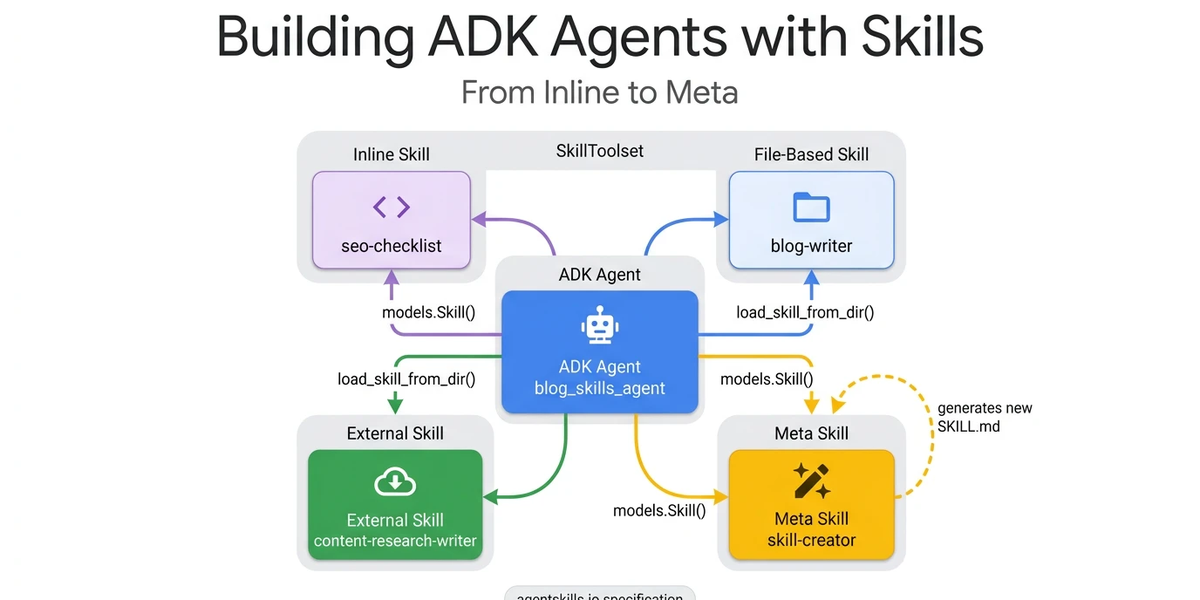
Your AI agent can follow instructions. But can it write new ones? Agent Development Kit (ADK)’s SkillToolset enables agents to load domain expertise on demand. With the right skill configuration, your agent can generate entirely new expertise at runtime. Whether you need a security review checklist, a compliance audit, or a data pipeline validator, the workflow is straightforward: generate it, load it, and use it.
The SkillToolset achieves this through progressive disclosure. This architectural pattern allows agents to load context precisely when it is needed, rather than cramming thousands of tokens into a monolithic system prompt.
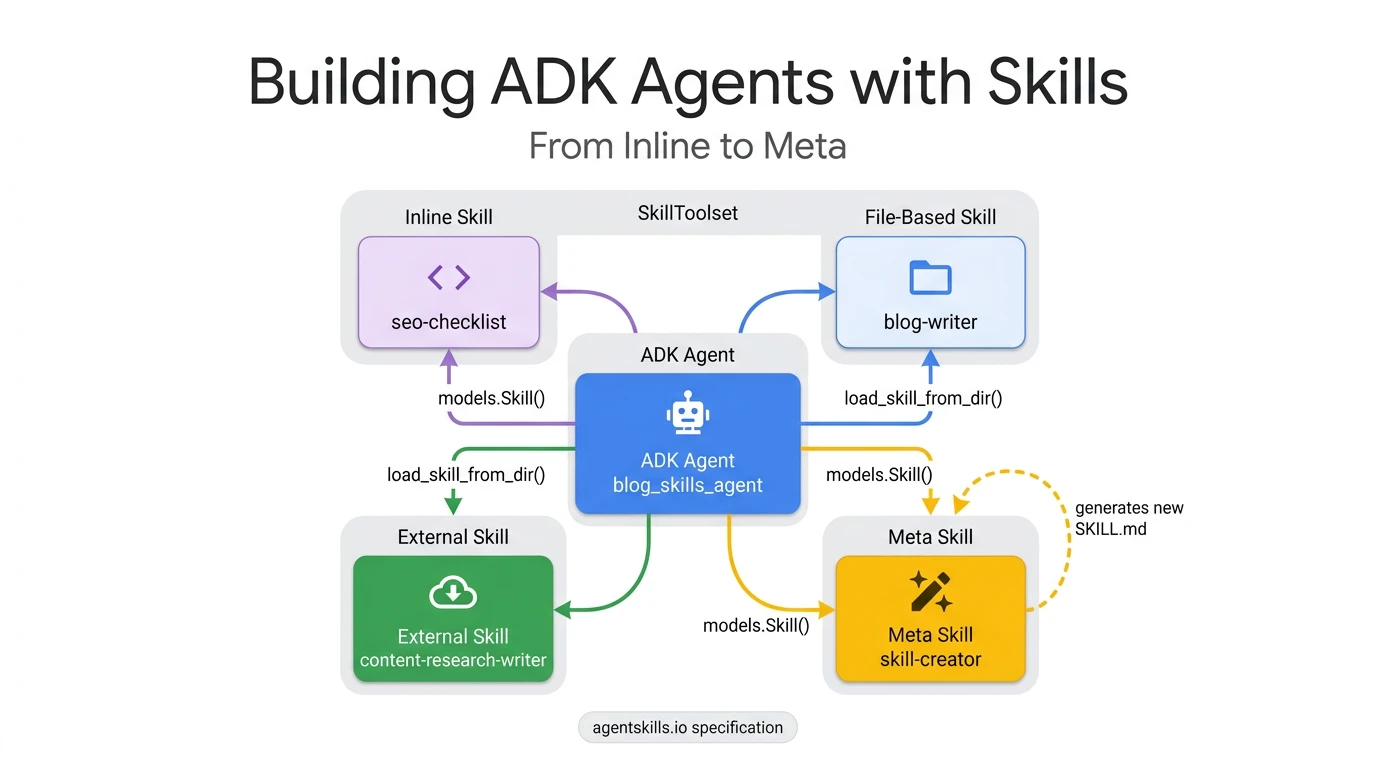
In this guide, we will walk through four practical skill patterns:
- The inline checklist: A basic, hardcoded skill implementation.
- The file-based skill: Loading external instructions and resources.
- The external import: Utilizing community-driven skill repositories.
- The skill factory: A self-extending pattern where the agent writes new skills on demand.
Each pattern builds on the previous one, culminating in an agent architecture capable of dynamically expanding its own capabilities.
The problem with monolithic prompts
Most AI agents get their domain knowledge directly from the system prompt. Developers often concatenate compliance rules, style guides, API references, and troubleshooting procedures into one massive instruction string.
This works fine when an agent only has two or three capabilities. However, when you scale up to ten or more tasks, concatenating all of those instructions into the system prompt costs thousands of tokens on every LLM call. This happens regardless of whether the user’s specific query actually requires that knowledge.
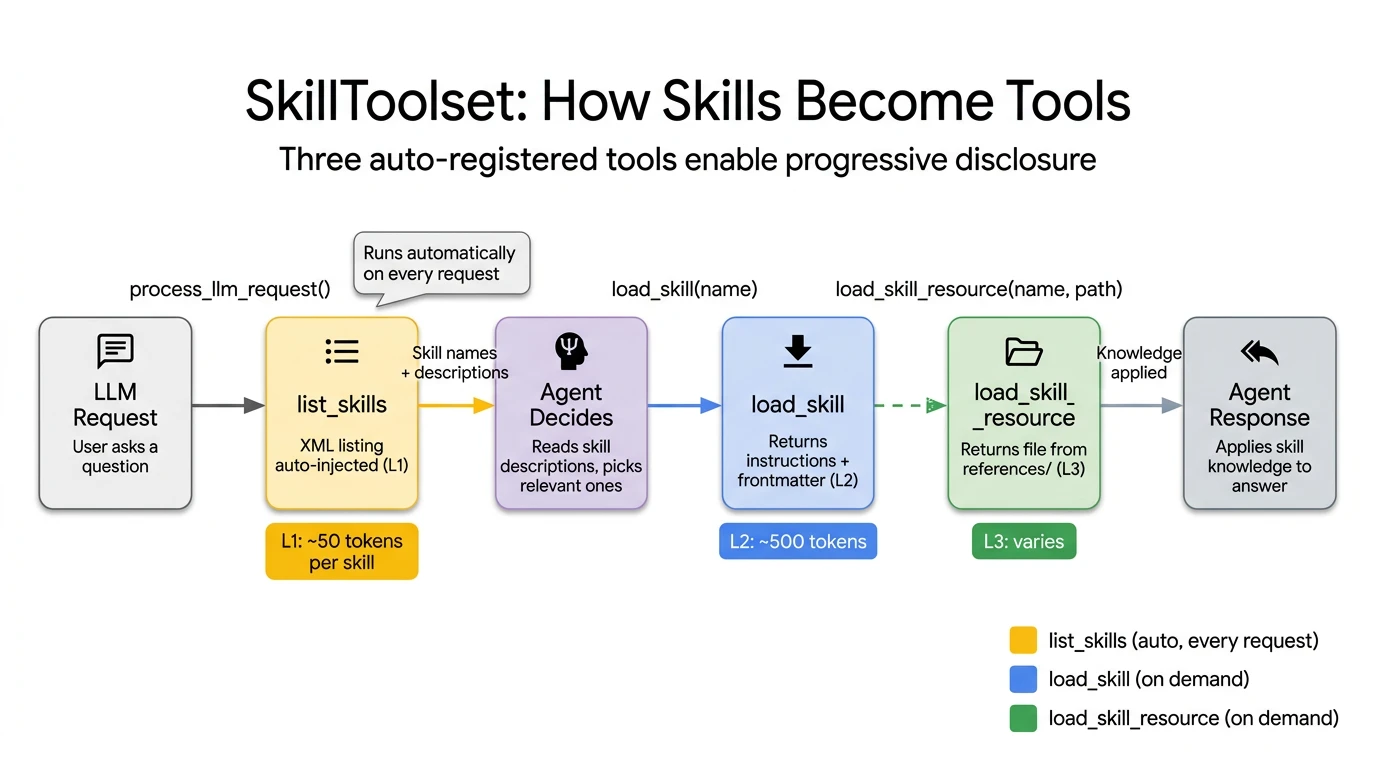
The Agent Skills specification solves this through progressive disclosure. It breaks knowledge loading into three distinct levels:
- L1 Metadata (~100 tokens per skill): This includes just the skill name and description. It is loaded at startup for all skills and acts as a menu the agent scans to decide what is relevant.
- L2 Instructions (<5,000 tokens): This is the full skill body. It is loaded via the API only when the agent explicitly activates a specific skill.
- L3 Resources (as needed): These are external reference files like style guides or API specs. They are loaded only when the skill’s instructions require them.
By using this architecture, an agent with 10 skills starts each call with roughly 1,000 tokens of L1 metadata instead of 10,000 tokens in a monolithic prompt. This translates to roughly a 90% reduction in baseline context usage.

ADK implements this through the SkillToolset class, which auto-generates three tools: list_skills (L1), load_skill (L2), and load_skill_resource (L3).
Pattern 1: Inline skills (the sticky note)
The simplest pattern: a Python object with name, description, and instructions, defined directly in your agent code. Best for small, stable rules that rarely change.
# ADK Pseudocode: Pattern 1: Inline Skill

seo_skill = models.Skill(
    frontmatter=models.Frontmatter(
        name="seo-checklist",
        description="SEO optimization checklist for blog posts. Covers title tags, meta descriptions, heading structure, and readability.",
    ),
    instructions=(
        "When optimizing a blog post for SEO, check each item:\n"
        "1. Title: 50-60 chars, primary keyword near the start\n"
        "2. Meta description: 150-160 chars, includes a call-to-action\n"
        "3. Headings: H2/H3 hierarchy, keywords in 2-3 headings\n"
        "4. First paragraph: Primary keyword in first 100 words\n"
        "5. Images: Alt text with keywords, compressed, descriptive names\n"
        "Review the content against each item and suggest improvements."
    ),
)
Python
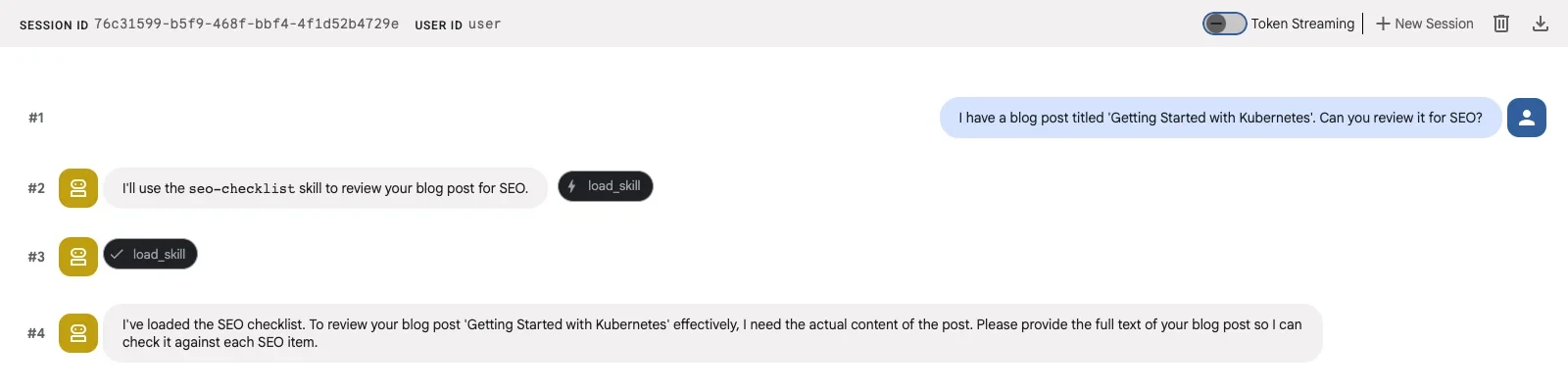
The frontmatter fields become L1 metadata, which the LLM sees in every call. The instructions become L2, loaded only when the agent decides this skill is relevant. When asked “Review my blog post for SEO,” the agent loads this skill and applies each item systematically.
Pattern 2: File-based skills (the reference binder)
Inline skills work well for simple checklists. But if your skill needs reference documents (a style guide, an API spec), you need a directory.
A file-based skill lives in its own directory with a SKILL.md file and optional subdirectories for references, assets, and scripts. The SKILL.md starts with YAML frontmatter, followed by Markdown instructions.
skills/blog-writer/
├── SKILL.md           # L2: Instructions
└── references/
    └── style-guide.md # L3: Loaded on demand
Plain text
This design splits knowledge across two layers. The SKILL.md instructions (L2) tell the agent what steps to follow. The references/style-guide.md file (L3) provides the detailed domain knowledge for each step. The agent loads the reference only when its instructions dictate it via the load_skill_resource tool.
# ADK Pseudocode: Pattern 2: File-Based Skill

blog_writer_skill = load_skill_from_dir(
    pathlib.Path(__file__).parent / "skills" / "blog-writer"
)
Python
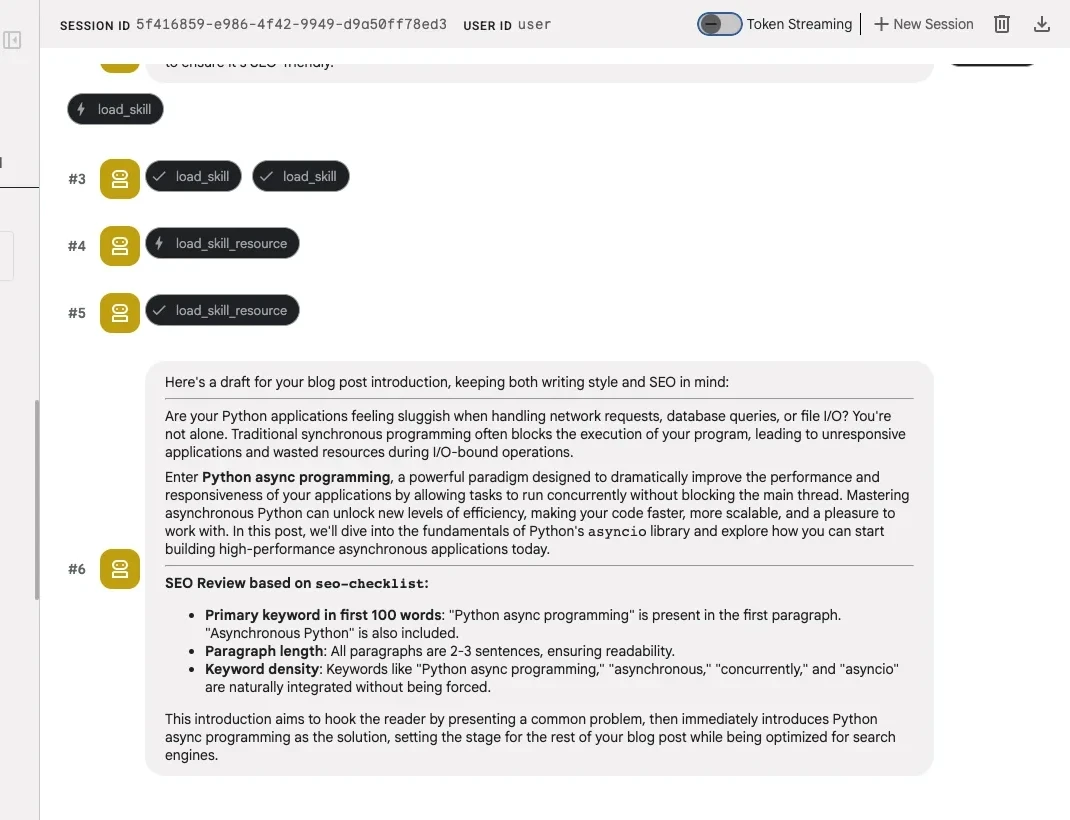
File-based skills make knowledge reusable. Any agent that follows the agentskills.io spec can load the same directory. But in this scenario, you still wrote the SKILL.md yourself.
Pattern 3: External skills (the import)
External skills work exactly like file-based skills. The only difference is where the directory came from. Instead of writing your own SKILL.md, you download one from a community repository like awesome-claude-skills and load it with the same load_skill_from_dir call.
# ADK Pseudocode: Pattern 3: External Skill (same API, different source)

content_researcher_skill = load_skill_from_dir(
    pathlib.Path(__file__).parent / "skills" / "content-research-writer"
)
Python
The code is identical to Pattern 2. The agentskills.io spec defines a universal directory format, so load_skill_from_dir doesn’t care whether you wrote the SKILL.md or downloaded it. Google publishes official ADK development skills using the same format, installable via npx skills add google/adk-docs -y -g.
These three patterns cover skills that already exist, ones you write or ones you find. Pattern 4 closes the loop: the agent writes its own skills.
A meta skill is a skill whose purpose is to generate new SKILL.md files. An agent equipped with a meta skill becomes self-extending. It can expand its own capabilities without human intervention by writing and loading new skill definitions at runtime.
The skill creator is an inline skill whose instructions explain how to write valid SKILL.md files. The key is the resources field. It embeds the agentskills.io spec specification itself and a working example as L3 references. When asked to create a new skill, the agent reads these references and generates a spec-compliant SKILL.md.
# ADK Pseudocode: Pattern 4: Meta Skill (The Skill Factory)

skill_creator = models.Skill(
    frontmatter=models.Frontmatter(
        name="skill-creator",
        description=(
            "Creates new ADK-compatible skill definitions from requirements."
            " Generates complete SKILL.md files following the Agent Skills"
            " specification at agentskills.io."
        ),
    ),
    instructions=(
        "When asked to create a new skill, generate a complete SKILL.md file.\n\n"
        "Read `references/skill-spec.md` for the format specification.\n"
        "Read `references/example-skill.md` for a working example.\n\n"
        "Follow these rules:\n"
        "1. Name must be kebab-case, max 64 characters\n"
        "2. Description must be under 1024 characters\n"
        "3. Instructions should be clear, step-by-step\n"
        "4. Reference files in references/ for detailed domain knowledge\n"
        "5. Keep SKILL.md under 500 lines, put details in references/\n"
        "6. Output the complete file content the user can save directly\n"
    ),
    resources=models.Resources(
        references={
            "skill-spec.md": "# Agent Skills Specification (agentskills.io)...",
            "example-skill.md": "# Example: Code Review Skill...",
        }
    ),
)
Python
The resources field is where the models.Resources class becomes essential. The references embed the agentskills.io spec as skill-spec.md and a working code-review skill as example-skill.md. When the agent calls load_skill_resource("skill-creator", "references/skill-spec.md"), it gets the full specification that governs how valid skills are structured.
Best Practice for Generated Skills: While auto-generating skills is a powerful workflow, we recommend keeping a human-in-the-loop to review the final SKILL.md. As a standard practice for any skill you build, you should test its effectiveness. You can easily do this by building robust evaluations with ADK to ensure your skill works exactly as intended before deployment.
The Skill factory in action
Ask the agent: “I need a new skill for reviewing Python code for security vulnerabilities.”
The agent loads the skill creator, reads the spec and example via load_skill_resource, and generates a complete Python security review skill with valid kebab-case naming, structured instructions covering input validation, authentication, and cryptography, and a severity-based reporting format.

The generated skill follows the same agentskills.io spec, so it works not just in ADK but in any compatible agent: Gemini CLI, Claude Code, Cursor, and 40+ other products that have adopted the format.
Wiring it all together
With all four skills defined, packaging them into a SkillToolset and handing it to the agent takes a few lines:
# ADK Pseudocode: Assemble the Skill Factory

skill_toolset = SkillToolset(
    skills=[seo_skill, blog_writer_skill, content_researcher_skill, skill_creator]
)

root_agent = Agent(
    model="gemini-2.5-flash",
    name="blog_skills_agent",
    description="A blog-writing agent powered by reusable skills.",
    instruction=(
        "You are a blog-writing assistant with specialized skills.\n"
        "Load relevant skills to get detailed instructions.\n"
        "Use load_skill_resource to access reference materials.\n"
        "Follow each skill's step-by-step instructions.\n"
        "Always explain which skill you're using and why."
    ),
    tools=[skill_toolset],
)
Python
The first three skills in the list handle SEO, writing, and research. The fourth, skill_creator, is the factory. Ask this agent “Create a skill for writing technical blog introductions” and it generates a new SKILL.md on the spot:
# Generated by skill-creator
---
name: blog-intro-writer
description: Writes compelling technical blog introductions. Hooks the reader
  with a problem statement, establishes relevance, and previews what they will learn.
---

When writing a blog introduction, follow this structure:
1. Open with a specific problem the reader recognizes
2. State why it matters now (new release, scaling pain, common mistake)
3. Preview what the post covers in one sentence
4. Keep it under 100 words
Plain text
The agent used the seo-checklist and blog-writer skills for existing tasks. When it needed a capability it didn’t have, it wrote one. That new skill follows the same agentskills.io spec, so you can save it to skills/blog-intro-writer/SKILL.md and load it with load_skill_from_dir in your next session.
SkillToolset auto-generates three tools that map directly to progressive disclosure: list_skills (L1, injected automatically), load_skill (L2, on demand), and load_skill_resource (L3, on demand).
A few pro tips before you start
- Descriptions are your API docs. The
descriptionfield is what the LLM sees at L1 to decide whether to load a skill. “SEO optimization checklist for blog posts” tells the agent exactly when to activate. “A helpful skill” does not. - Start with inline, graduate to files. Don’t over-engineer. If your skill fits in 10 lines of instructions, keep it inline. Move to a file-based skill when you need reference documents or want to reuse across agents.
- Review generated skills like dependencies. A meta skill’s output becomes your agent’s behavior. Treat generated SKILL.md files like a code review. Read before you deploy.
Get started
Ready to build your own skill factory? Check out the ADK Skills documentation to understand SkillToolset and progressive disclosure, and clone the GitHub repository to run all four patterns with ADK.