
Google is handing Drive a sharper shield.
The tech giant’s latest rollout equips the platform with AI-powered ransomware detection and built-in file recovery, with Google claiming the new model identifies 14 times more threats than before. With this update, the features graduate from beta into broad availability, signaling a more active role for Drive in stopping attacks before they spiral.
First introduced in beta in September 2025, the upgraded release focuses on speed and follow-through. Detection happens faster, and recovery is no longer an afterthought but a guided process. The update also offers a clearer view of what happens behind the scenes when files start getting encrypted, and access begins to slip away.
Syncing stops when Drive spots trouble
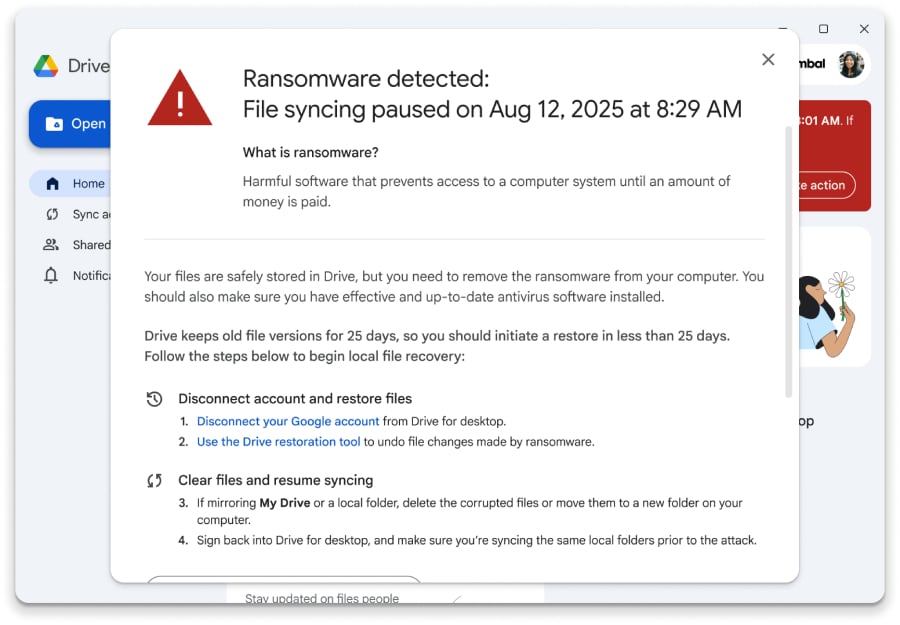
When Drive detects suspicious encryption activity on a desktop device, it does not just flag the problem and leave the rest to the user. Google Drive for desktop pauses file syncing as soon as ransomware is detected, to prevent infected files from spreading to cloud copies and causing further damage.
The system then starts surfacing alerts to the people who need to know. Users see a notification on their computer, while admins get both an email and an alert in the Admin console security center, giving IT teams a way to spot the issue and respond without waiting for a help desk ticket to land. This alert flow works alongside the sync pause, so the response starts immediately rather than after the damage is already done.
Once the threat is detected, users are guided to a file restoration interface where they can select multiple earlier, uninfected versions of files and restore them in bulk. According to Google, that as a much simpler alternative to the usual mess of re-imaging devices or relying on outside recovery tools, especially for people working in common Windows and Microsoft Office setups.
What’s open to more users, and what stays tiered
File restoration is available to all Google Workspace customers, Workspace Individual subscribers, and personal Google accounts, giving the update’s recovery side a much wider reach.
Ransomware detection, on the other hand, is available only on these tiers:
- Business Standard and Plus
- Enterprise Starter, Standard, and Plus
- Education Standard and Plus
- Frontline Standard and Plus
For organizations, both features are turned on by default and can be managed at the organizational-unit level in the Admin console. Detection has its own malware and ransomware settings, while file restoration is controlled separately.
Detection alerts on user computers require Drive for desktop version 114 or later, although syncing can still be paused on older versions. The update is already available, with access depending on account type, subscription tier, and admin settings.
Android 17’s newest beta leans into refinement as Google locks in the platform ahead of launch.