
Key takeaways
- Square is an all-in-one platform that combines payment processing, POS software, and business tools in one system.
- The base POS software is free, with paid plans (Square Plus and Premium) adding advanced features and lower processing rates.
- Square uses flat-rate transaction fees and requires businesses to use its built-in payment processor (Square Payments).
- It supports in-person, online, and remote payments, along with tools for inventory, customer management, and staffing.
- Square works best for small to midsize businesses but may be less cost-effective for high-volume or highly customized operations.
Square started as a simple mobile card reader but has grown into a full business platform that supports payments, point-of-sale (POS) operations, and back-office management. Today, businesses can use Square to accept payments in person, online, or remotely while managing inventory, customers, and cash flow from a single system.
Its appeal comes from a free entry point, straightforward pricing, and an ecosystem of tools that can scale with a business over time. But while Square is easy to adopt, its flat-rate pricing and limited flexibility may not suit every use case.
In this guide, I break down how Square works, what it costs, its core features, and when it makes sense to consider alternatives.
What is Square?
Square is a cloud-based platform that enables businesses to accept payments and manage operations from a single system. While it started as a payment processor, it has evolved into a broader business platform that supports both in-person and online sales.
Square first gained traction in 2009 with the launch of its mobile card reader, which allowed businesses to accept card payments without long-term contracts, complex approval processes, or upfront costs. This simplified approach made it easier for small businesses to take payments anywhere and adopt modern payment technology.
Today, Square includes a range of tools beyond payment processing, such as:
- Point-of-sale (POS) software
- Payment processing across channels
- Ecommerce and online checkout tools
- Customer and team management features
- Business banking and financial services
All of these tools are connected, so transactions, inventory, and customer data update automatically across the platform. This allows businesses to run sales, track performance, and manage day-to-day operations without relying on multiple systems.
Square primarily serves small to midsize businesses but has expanded to support multi-location operations and more advanced workflows. Its modular structure allows businesses to start with a free plan and add features as they grow.
How does Square work?
Square combines payment processing with business management tools in a single system. At its core, it allows businesses to accept payments through credit cards, contactless methods, and ACH transfers, all processed through Square.
Once a payment is completed, the transaction is automatically recorded across built-in tools for sales tracking, inventory management, customer data, and reporting. This keeps business data consistent without requiring manual updates.
Square’s system includes several integrated product areas:
- Payments: In-person and mobile payments, POS hardware, virtual terminal, invoicing, and dispute management
- Point-of-sale (POS): Mobile and tablet-based apps, inventory tracking, reporting, and customer and team management
- Industry-specific POS: Solutions for retail (Square for Retail), restaurants (Square for Restaurants), and service businesses (Square Appointments)
- Online selling: Ecommerce tools through Square Online, including ordering and checkout
- Business management: Payroll, email marketing, customer messaging, and loyalty programs
- Banking: Business checking and savings accounts, debit card, and financing
Because transactions are connected to these tools, updates happen in real time. For example, a completed sale automatically adjusts inventory levels and updates reporting.
What you can do with a free Square account
Square is widely adopted because of its free plan, which allows businesses to start accepting payments and managing operations without upfront software costs. This makes it a practical option for startups, small businesses, and occasional sellers that need a low-risk way to get started. Most businesses can start accepting payments the same day.
A free Square account includes the core tools needed to accept payments and run basic operations. While advanced features are reserved for paid plans, the free tier supports selling in person, online, and remotely from a single system.
- Accept payments across channels: Accept in-person payments using tap, dip, or swipe methods, take online payments through checkout links or a basic online store, send invoices for remote payments, and process transactions without a monthly subscription fee
- Use a point-of-sale (POS) system: Process itemized or custom transactions, track sales activity in real time, manage a basic item library, and run operations through Square’s POS app on mobile devices, tablets, or hardware
- Sell online with a basic website: Create a simple online store, accept orders for pickup or delivery, sync products and sales across channels, and share checkout links, QR codes, or buy buttons
- Send invoices and manage payments: Send invoices to customers, accept card and online payments, track payment status, and manage billing workflows within the same platform
- Manage bookings and appointments: Accept online bookings, manage schedules, and connect appointments directly to payments and customer records
- Access basic financial tools: Eligible sellers can access Square’s business banking features, including checking and savings accounts, monitor cash flow, and transfer funds from sales within the platform
How is Square priced?
Square’s pricing is a key reason it appeals to small businesses. You can start using its POS apps for retail, restaurants, appointments, or general sales with no monthly fee and no long-term contracts.
In October 2025, Square introduced a unified pricing model that bundles its tools into three plans — Square Free, Square Plus, and Square Premium — instead of pricing them separately. Higher tiers include more advanced features and lower processing rates.
Square combines subscription plans with per-transaction fees. You can start with the free plan and upgrade as needed, but all plans include processing costs based on how payments are accepted.
Below, I break down each plan, what’s included, and how Square’s transaction fees work so you can estimate your total cost.
Square pricing plans
Square’s pricing is structured at the account level, meaning a single subscription covers access to its core tools rather than requiring separate plans for each product. The base POS software is free to use, and businesses only pay monthly fees when upgrading to plans with more advanced features.
Paid plans are billed per location and unlock additional capabilities across areas like reporting, marketing, staffing, and industry-specific tools. This approach simplifies pricing by grouping features into tiers instead of charging for each tool individually.
- Square Free ($0/month per location): Includes POS software, a basic online store, invoicing, and payment processing, with chat and email support and limited phone support (6 a.m.- 6 p.m., PT, Monday to Friday, for the first 90 days), but does not include advanced features like text marketing, kiosk apps, or kitchen display system (KDS) tools
- Square Plus ($49/month per location): Includes everything in Free, along with expanded POS capabilities, access to additional tools like text message marketing (500 messages included, then 3 cents per message), and full weekday phone support (6 a.m.-6 p.m., PT, Monday to Friday), plus access to paid add-ons such as Square KDS ($30/month per device) and Square Kiosk ($50/month per device)
- Square Premium ($149/month per location): Includes all features from Plus, along with the highest level of support (24/7 phone support), increased text marketing limits (2,500 messages included, then 1.5 cents per message), and lower-cost access to add-ons such as Square KDS ($20/month per device) and Square Kiosk ($30/month per device)
Additional fees and feature-based pricing
- Gift card fees: Square charges a 2.5% load fee for physical and eGift cards on Free and Plus plans, while Premium removes this fee entirely
- Customer engagement tools: Text message marketing is not available on Free, included in limited volume on Plus, and expanded with lower per-message costs on Premium
- Inventory and restaurant tools: Advanced inventory integrations, such as Square Restaurant Inventory by MarketMan, are available as add-ons starting at $99/month per location on higher-tier plans
- Restaurant operations apps: Square KDS and Square Kiosk are not included in Free and require monthly per-device fees on Plus and Premium plans, with lower pricing available at higher tiers
Square payment processing fees
Square uses a flat-rate payment processing model, meaning you pay a fixed fee per transaction instead of interchange-plus pricing. While this simplifies cost predictability, it also means that when you use Square’s ecosystem, you are required to process payments through Square Payments.
Unlike some POS providers, Square does not support third-party payment processors, so you cannot shop around for lower rates or negotiate with external providers.
Square’s standard processing fees are:
- Cash, check, and other non-card tenders: No fee
- In-person payments (tap, dip, swipe): 2.6% + 15 cents per transaction
- Online payments: 3.3% + 30 cents per transaction
- Invoiced payments: 3.3% + 30 cents per transaction
- Manually entered (keyed) payments: 3.5% + 15 cents per transaction
- ACH bank transfers: 1% per transaction (minimum $1)
- Afterpay transactions: 6% + 30 cents per transaction
- CBD program transactions: Starting at 3.5% + 10 cents per transaction
- Bitcoin payments: 0% until 2027
Square does not charge a monthly fee for payment processing, but transaction fees apply regardless of your subscription plan.
Businesses processing over $250,000 annually may be eligible for custom pricing and lower processing rates. These discounts are not publicly listed and require contacting Square’s sales team.
Square may also waive chargeback fees up to a set monthly limit, helping reduce dispute-related costs.
Related:
How long does Square take to process payment?
Square lets you transfer funds from completed transactions to your bank account at varying speeds. By default, fund transfers are completed the next business day, and these are free.
Payments taken before 5 p.m., PT/8 p.m., ET will be available in a merchant’s bank account the next business day. Payments accepted on Friday before 5 p.m., PT will be posted to a merchant’s bank account by Monday morning (depending on your bank’s processing speeds).
Instant and same-day payout options are also available for an added fee — 1.75% of the amount.
Square hardware
Square’s hardware lineup lets businesses start with minimal setup and scale as needed. You can accept payments directly on a compatible phone using the Square POS app or use a free magstripe reader with your first order.
From there, Square offers mobile readers, handheld devices, countertop terminals, and full register systems, allowing you to upgrade without switching platforms. Financing options are available, and short-term rentals can be arranged through Fello.
Square hardware devices
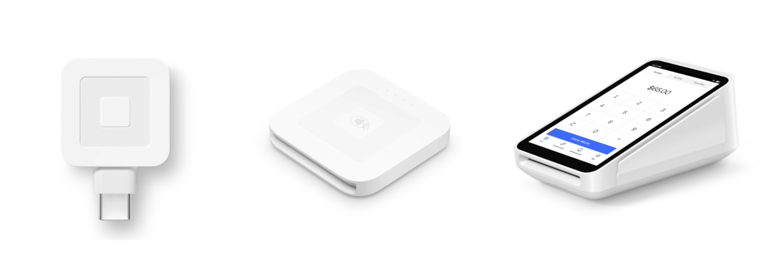
- Square Reader for magstripe (first reader free): A basic swipe reader that does not need charging and is the lowest-cost way to start taking card payments in person, though it is best suited for sellers who only need occasional card acceptance or a backup device.
- Square Reader for contactless and chip ($59): A portable reader for tap and chip payments that works well for mobile sellers and businesses that need a more current payment option than magstripe alone.
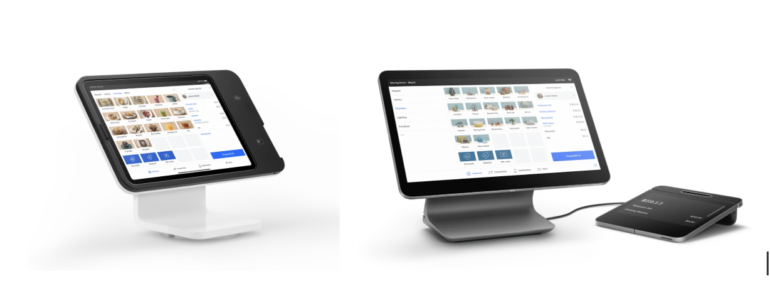
- Square Stand ($149 or $14/month for 12 months): An iPad-based countertop POS with a swiveling design and built-in card readers, making it a good fit for small counters that want a more polished checkout setup.
- Square Handheld ($399 or $37/month for 12 months): A pocketable POS built for tableside orders and payments, with a built-in barcode scanner, making it a strong option for restaurants, line-busting, and staff who need to move around the sales floor.
- Square Terminal ($299 or $27/month for 12 months): An all-in-one POS device with a built-in receipt printer that accepts tap, dip, and swipe payments without requiring a separate tablet or phone.
- Square Register (2nd generation) ($899 or $44/month for 24 months): A full POS system with dual screens for staff and customers, designed for busy counters and higher-volume environments that need faster checkout and a more complete in-store setup.
Best use cases
- For one-off events or short-term setups: Rent Square hardware through Fello, since Square links directly to that rental option from its hardware page, and it can be a better fit than buying devices you only need temporarily. Based on your note, Fello supports larger registers, mobile POS devices, accessories, custom quotes by rental dates and quantities, and optional add-ons such as damage and theft coverage, plus on-site setup and support. Square’s site confirms the Fello rental path, but the quote and insurance details should be checked directly with Fello before publishing.
- For sellers who want the lowest-cost starting point: Use the free magstripe reader or tap-to-pay on a phone, since both options reduce upfront hardware costs.
- For mobile sellers: Choose the contactless and chip reader if you need a small, portable device for markets, pop-ups, and field sales.
- For tableside service or staff on the move: Choose Square Handheld, since it is designed for mobile POS use and includes a built-in barcode scanner.
- For service businesses or quick counter transactions: Choose Square Terminal if you want an all-in-one device with a receipt printer and no separate tablet.
- For small retail counters or cafes: Choose Square Stand if you want an iPad-based countertop setup with a customer-facing checkout flow.
- For busy retail stores or restaurants: Choose Square Register if you need a full countertop POS with dual screens and faster checkout for higher transaction volume.
Square POS systems by industry
Square offers industry-specific POS systems designed to match how different businesses operate, with workflows tailored for retail, restaurants, and service-based businesses. Each solution builds on Square’s core platform while adding features specific to daily operations.
- Retail businesses (Square for Retail): Track inventory with stock alerts, manage returns and exchanges, sync in-store and online sales, and handle fulfillment through shipping, delivery, or in-store pickup
- Restaurants (Square for Restaurants): Take orders tableside or at the counter, manage dine-in, pickup, and delivery from one system, and streamline front- and back-of-house operations
- Service-based businesses (Square Appointments): Accept online bookings, manage schedules and staff calendars, process payments before or after services, and send automated reminders to reduce missed appointments
Square benefits
Square offers several advantages for small to midsize businesses that want a simple, all-in-one system for payments and operations.
- Free entry point: Start with a $0/month plan that includes POS software, online selling tools, and invoicing, with no upfront software costs
- All-in-one platform: Manage payments, POS, ecommerce, customers, and basic financial tools in one system instead of using multiple providers
- Ease of use: Set up quickly and run day-to-day operations through intuitive POS apps, hardware, and a centralized dashboard
- Transparent pricing: Pay flat-rate transaction fees with no long-term contracts or hidden charges, making costs predictable
- Omnichannel selling: Accept payments in person, online, on mobile, and remotely, with transactions tracked in one place
- Scalability: Start with core tools and add paid features or plans as your business grows
Square’s drawbacks
Despite plenty of benefits with Square, the service still comes with limitations and drawbacks. Here are a few areas where Square falls short of its competitors:
- Business limitations: Square does not work with high-risk businesses (online gambling, age-restricted items, and more).
- Payment processing fees: Square’s fees aren’t the lowest on the market, even though it is very transparent with its flat-rate pricing. Square only gets you lower processing fees when you reach $250,000 in annual sales. Other providers, such as Stripe and PayPal, may offer lower fees at lower annual sales thresholds.
- Customer support: Square provides limited support hours outside its premium plans and is largely supported by online tutorials and chat. Real-world user reviews also say that support is inconsistent as the level and quality you get highly depend on the agent you come into contact with.
- Account stability: There are complaints on third-party user review sites about Square’s account holds and freezes, which typically occur when you have excessive chargebacks or fraudulent charges. These issues take time to resolve and can have a big impact on business operations.
Is Square right for your business?
Square is a strong fit for businesses that want an easy-to-use, all-in-one system, but it may not work for every use case.
- Best suited for: Small to midsize businesses, companies selling across multiple channels, and teams that want a single platform for payments, POS, and operations
- Less suitable for: Enterprise environments with complex integrations, businesses focused on minimizing processing costs at scale, and teams that require highly customized payment workflows
Square competitors and alternatives
Square is a strong all-in-one platform, but it isn’t the best fit for every business. Depending on your transaction volume, technical requirements, and pricing preferences, other providers may be a better option.
Square vs PayPal
- Square offers a full POS ecosystem: Square provides built-in POS software, hardware, inventory management, and business tools, making it better suited for in-person and omnichannel businesses
- PayPal is more focused on online payments: PayPal is widely used for ecommerce and peer-to-peer transactions, with simpler checkout integrations but fewer native POS and operational tools
Square is a better fit when you need in-person sales and a complete business system, while PayPal works better for businesses that primarily sell online and want a widely recognized checkout option.
Square vs Stripe
- Square prioritizes ease of use and bundled tools: Square is designed for quick setup, with prebuilt features for payments, POS, and business management
- Stripe offers greater customization and API flexibility: Stripe is developer-focused, allowing businesses to build custom checkout flows, subscriptions, and integrations
Square works well for teams that want a ready-to-use system with minimal setup, while Stripe is better suited for businesses that need custom workflows or deeper technical control.
Square vs Helcim
- Square uses flat-rate pricing: Square charges a fixed percentage per transaction, making costs predictable but often higher at scale
- Helcim uses interchange-plus pricing: Helcim passes through card network fees with a markup, which can result in lower overall costs for high-volume businesses
Square makes more sense for simplicity and ease of use, while Helcim is often a better option for businesses focused on reducing processing costs at higher volumes.
When to consider Square alternatives
- High-transaction-volume businesses: Flat-rate pricing can become expensive as volume increases, making interchange-plus providers more cost-effective
- Organizations needing custom checkout flows: Platforms like Stripe offer more control over the payment experience
- Teams requiring deeper API control: Developer-focused tools provide more flexibility than Square’s built-in system
- Online-first businesses: If you don’t need POS hardware or in-person tools, providers like PayPal or Stripe may be more streamlined
Related: 7 Best Square alternatives reviewed by experts
How to set up a Square business account
To get started on using Square, you need to sign up for a business account. Follow the steps below to set up a Square business account:
Step 1: Choose your business structure. Square will ask you to provide information depending on your structure, which can be a sole proprietorship, limited liability company (LLC), private company, public company, partnership, or charity (nonprofit). Square has a list of requirements based on the business structure you will choose.
Step 2: Verify your personal identity. Financial institutions like Square are governed by federal law and banking industry regulations, so they would need to verify and record information that identifies each person who opens an account.
Step 3: Link your bank account. I recommend using a business bank account; open one if you don’t have one yet.
Step 4: Set up transfer options. Square transfers are set to a Next Business Day schedule by default. You can send instant or same-day transfers for an additional fee.
Step 5: Log in to your Square account once you are done with the initial setup. You can do this from the Square Point of Sale app or your Square Dashboard (web browser).
Step 6: Order Square hardware if you sell in-person.
Step 7: Create your product listings. Your Square dashboard has an item library where you can create, edit, and manage products.
Step 8: (optional) Add team members (employees) if needed. You can do this from your Square Point of Sale app or Square Dashboard by going to Staff > Team > Team members, and selecting Add team member.
Step 9: (optional) Set up your free Square online store, if you plan to take orders or sell online.
Also Read: How to use Square: An in-depth guide for new users
How to use the Square payment system
As mentioned, you can use the Square payment system to accept mobile, online, and in-store payments and even process manual payments and recurring payments. Below, I list the steps involved in processing mobile and in-person sales.
For mobile payments:
- Download the Square POS mobile app (iOS or Android) and ensure you have the latest version.
- Sign in to your Square mobile app.
- Connect your mobile card reader to accept tap, dip, and swipe payments. Plug it on your phone or connect it via Bluetooth, depending on the card reader you have.
- Select items for the sale transaction by going to the item library in the mobile app.
- Once the items are chosen, tap Checkout, and when you are ready to accept the payment, tap Charge.
- Select the customer’s chosen payment method—swipe, tap, or dip; cash, keyed-in, send payment link, QR code, etc.
**You can process offline payments temporarily for 24 hours if you lose Internet connection. Toggle Allow Offline payments from Settings > Checkout > Offline payments. The 24-hour window includes uploading the payment data of your sale transactions. Once the window expires, the Square app will not be able to collect the payments anymore.
For in-person payments:
- Order your Square hardware of choice.
- Set up your POS app in your chosen hardware by logging into your account and setting up your store.
- To log a sale, it will be similar to logging sales using the mobile app. Instead you will see the Item library through a bigger screen.
- Collect payments through the Square Terminal or Square Stand/Square Mount. This step will be similar to mobile payments.
Frequently asked questions (FAQs)
Is paying through Square safe?
Yes. Square uses end-to-end encryption, tokenization, and PCI-compliant systems to protect payment data for both businesses and customers.
How much does Square charge?
Square uses flat-rate pricing for payment processing. In-person payments start at 2.6% + 15 cents per transaction, while online payments start at 3.3% + 30 cents. Rates may vary for other payment types.
Can I withdraw money from Square?
Yes. Funds can be transferred to your bank account on a next-business-day schedule for free, or instantly for a fee. You can also set up automatic transfer schedules.
Does Square support recurring payments?
Yes. You can set up recurring payments using card-on-file, Square Invoices, or subscriptions through the Square Dashboard.