

It is no secret that the market for AI tools and services is rapidly growing. According to Statista, for example, the value of the AI market in 2026 promises to reach a staggering $335.29 billion and grow at a rate of 25.38% per year, reaching $1.3 trillion by 2032.
This astonishing expansion has been made possible largely by various AI applications, such as in marketing & sales, customer service, automotive, and, of course, software development.
Recognizing the potential of artificial intelligence for creating software solutions, many tech companies, from startups to giants like Microsoft, IBM, and Google, have invested heavily in AI assistants and AI-related research and development.
But is AI always good in software development, and what should you pay attention to when choosing a contractor that uses artificial intelligence in software development processes?
Benefits of AI Algorithms in Software Development
Artificial intelligence is an undeniably impactful ally in software engineering, not just speeding up workflows but also improving overall product quality and supporting better decision-making.

By analyzing large volumes of data, such as user behavior, system performance, and error logs, AI tools can provide actionable insights that help teams refine features and adjust product perception.
Additionally, AI lowers the barrier to entry for certain development tasks. Junior developers can become productive faster with AI guidance, while experienced engineers can focus more on architecture and complex problem-solving rather than repetitive coding tasks.
Types of AI Used in Software Development
One of the most common myths about AI in software development is that many people think it’s a single algorithm. Indeed, modern software development relies on a broad ecosystem of AI tools, each serving a specific role in the lifecycle.
Large Language Models (LLMs)
LLMs are the foundation of many AI-powered development tools. They are used for generating code, explaining logic, debugging, writing documentation, and even assisting with architectural decisions. Their versatility makes them a core component in modern development workflows.
AI Coding Assistants
AI coding assistants act as real-time collaborators for developers. They suggest code, complete functions, refactor logic, and help navigate large codebases. These assistants visibly boost productivity and reduce repetitive work.
AI Observability and Monitoring
AI-driven observability tools analyze logs, metrics, and system behavior in real time. They can detect unusual patterns, identify root causes of incidents faster, and even predict outages before they occur, improving system reliability and uptime.
AI Agents and Autonomous Workflows
AI agents are becoming more advanced, capable of executing multi-step tasks with minimal human input. For example, they can analyze a bug report, generate a fix, write tests, and propose a pull request. While still maturing, they represent the next step toward semi-autonomous development processes.
Local and Private AI Models
For companies concerned about data security, locally hosted models provide a safer alternative to cloud-based solutions. These models allow teams to use AI capabilities without exposing sensitive code or business logic, which is especially important for enterprise and regulated environments.
Who Can Use AI in Software Development?
The use of artificial intelligence in software development isn’t limited only to developers anymore. The technology has evolved and spread from engineers to all other members of product teams.

Product managers, for instance, can now apply artificial intelligence as well. They could use AI to get insights about users based on the data collected by tracking their activities and feedback, and make better decisions. Also, they can apply AI to compose product documentation, write user stories, and generate reports.
Designers, in turn, can apply AI during UI/UX design to generate interface ideas and usability tips and accelerate the prototyping process. Having behavioral insights at hand, they can create designs much faster and smarter.
Also, artificial intelligence software solutions can be helpful for business analysts and clients. They can leverage AI tools to understand more complex technical information, check documentation, and confirm or deny various ideas they may have.
Why Clients Should Care About AI Integration in 2026
Lately, AI integration has become a kind of indicator of the rate of a tech company and how much it keeps up with the times. It is believed that providers using AI coding assistants like GitHub Copilot and Cursor IDE can visibly accelerate coding, reduce costs, and improve software quality.
Even more impressive is the rise of AI models like Claude Sonnet 4.6, which now leads the field with both its regular and thinking versions. These advanced models help developers generate, refine, and troubleshoot code more effectively than ever before.
Three years ago, Statista calculated that software developers using an AI assistant finished their work almost twice as fast as those working without one. This means that one developer with AI systems could get as much done as two human developers without it.
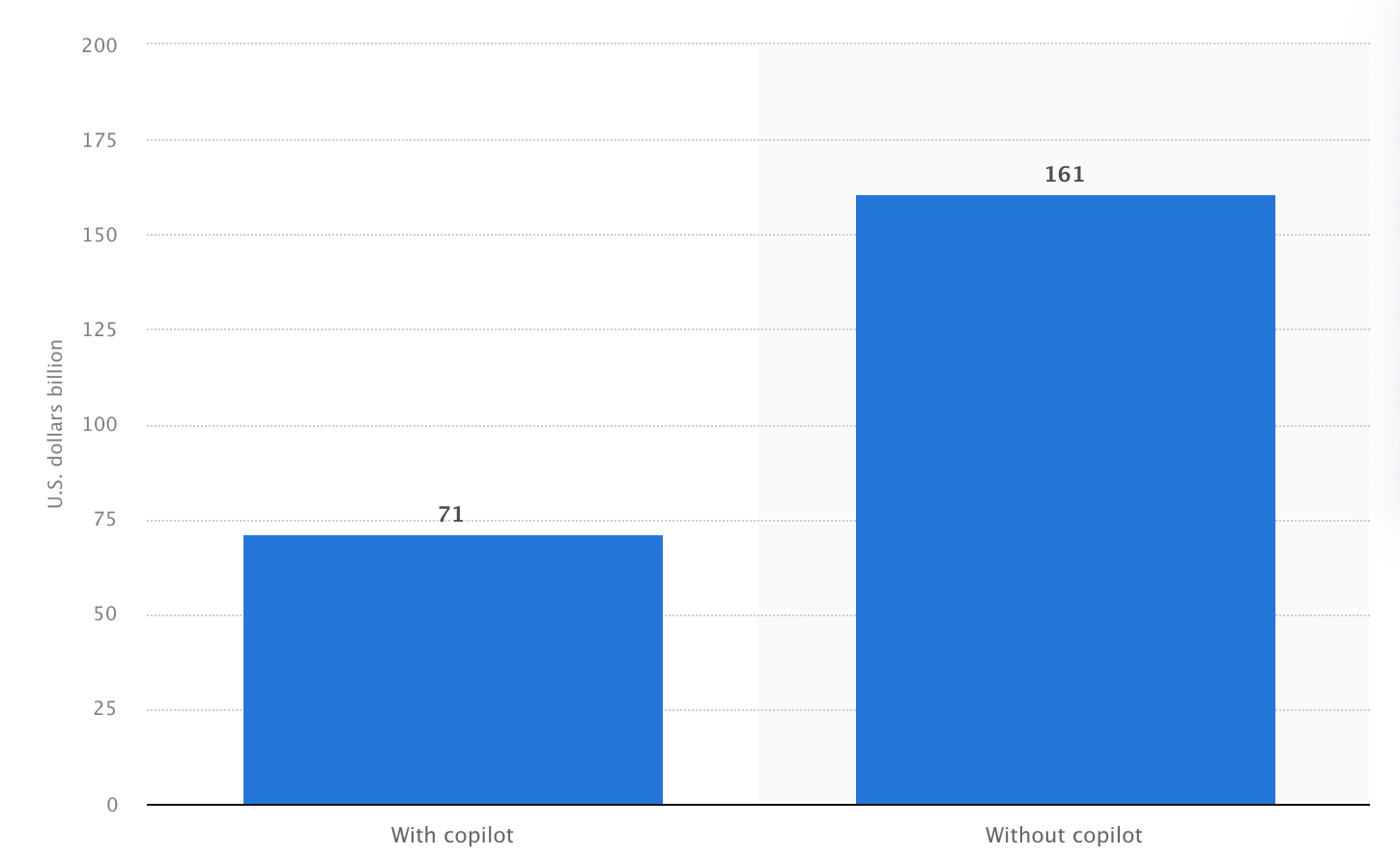
Difference in software development tasks with and without AI capabilities, Statista
Nonetheless, although there are many benefits of implementing AI assistants into software development workflows, there are also some data protection concerns for software companies.
Because many AI models learn from public code repositories like GitHub, they can generate code that accidentally violates open-source licenses. For example, tools like Copilot don’t provide credit to the original authors, which is often required.
Even worse, AI can sometimes copy existing code word-for-word, meaning software development teams might unknowingly use copyrighted code, putting their company in legal complications.
Beyond liability concerns, AI-generated code can introduce security risks. AI developers may unintentionally leak proprietary algorithms or confidential data, which could break a company’s competitive edge.
More harmful, AI-generated code might expose sensitive information like hardcoded credentials, database connections, or personal customer data, putting both the business and its users at risk.
In 2023, for example, Samsung Electronics banned its employees from using ChatGPT and other AI-powered chatbots, becoming one of several companies to tighten measures on the use of generative AI for software development.
The actions were taken after the accidental leak of confidential internal source code was discovered by an engineer who uploaded it to ChatGPT.
The Role of AI Within Development Cycles
AI tools have become a regular part of daily work for many IT professionals. More than 50% of all machine learning engineers use AI every day, and nearly as many data scientists rely on it just as often.
Back-end and full-stack developers also make good use of AI in software development, though a bit less frequently, with about one in three using these tools daily. But what exactly can AI do?
Code Writing
As we already mentioned, AI coding process assistants like GitHub Copilot, Cursor IDE with the help of Claude Sonnet 4.6, and other LLM’s have significantly improved coding speed and accuracy. They don’t just suggest snippets; they generate entire functions, refactor code, and even translate it between programming languages.
Modern IDEs like VSCode now integrate AI-powered development modes that proactively edit files, fix errors, and generate new code.
- In GitHub Copilot, this is known as Copilot Edit.
- In Cursor, a similar feature is called Composer.
These AI-driven modes allow for hands-free code improvements, where the assistant not only suggests but actively modifies the codebase in real-time.
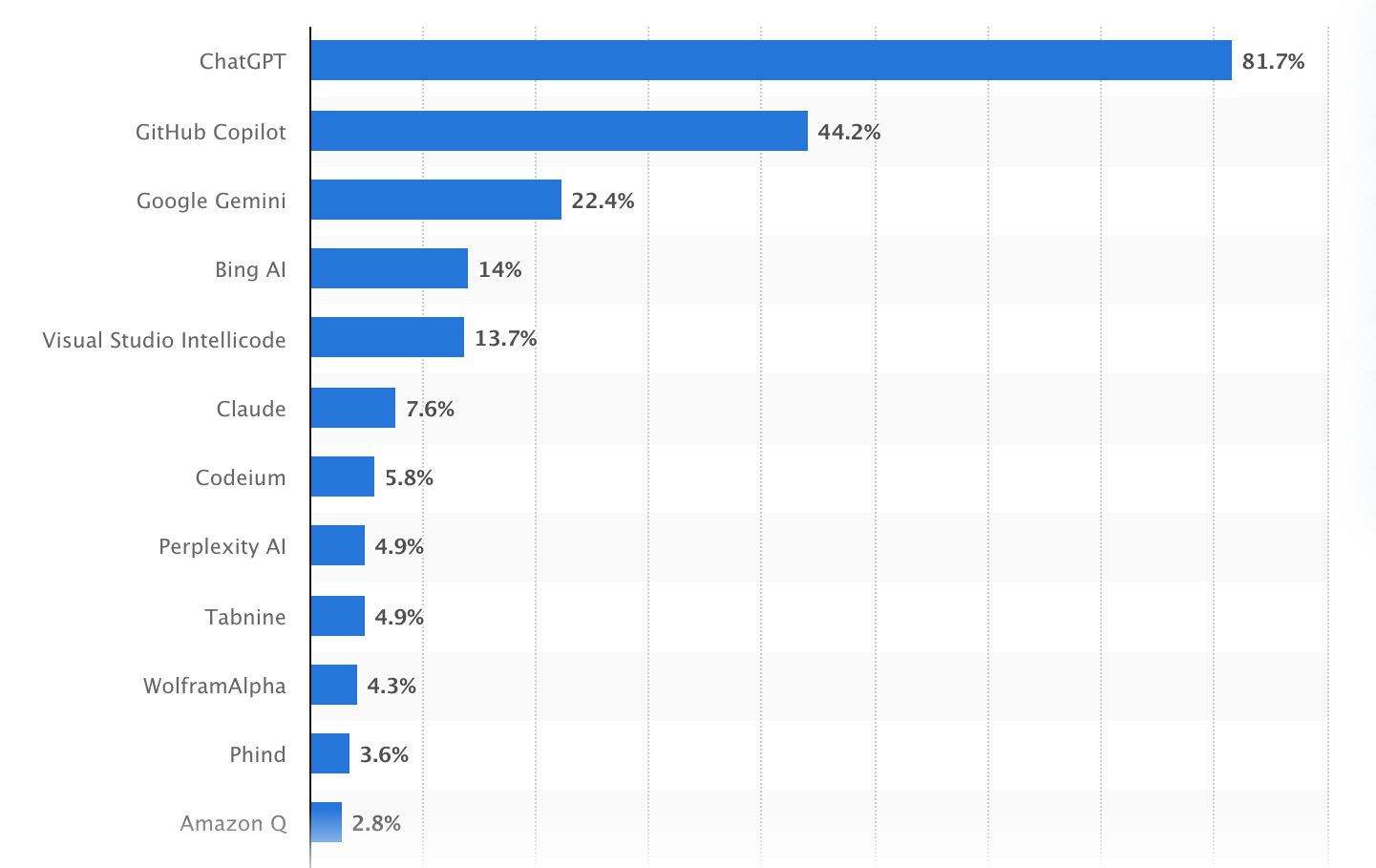
Most used artificial intelligence tools among developers, Statista
Code Testing: Manual and Automated
Beyond speeding up development, AI technologies are also playing a significant role in the testing phase.
For instance, instead of having a human tester click through every button, form, and menu, AI-powered tools can simulate user actions to instantly spot any gaps, making testing way more thorough.
AI can also create test cases on its own by inspecting the code and foretelling where problems might pop up.
This is especially useful for checking if individual functions work correctly and demonstrating different parts of the application function together as demanded.
With tools like Selenium and Cypress that apply AI, developers can also test websites by simulating how users interact with them in a browser. Some other AI-powered frameworks can even create test cases by themselves, saving developers time.
Code Security and Control
One of the main concerns in software development is protecting code from security risks, such as unauthorized access or data leaks. Via autonomous AI code review, developers can scan the code for any potential security flaws and get repair suggestions before bugs become disastrous.
Smarter Project Management
AI tools can assist project managers in planning tasks, estimating timelines, and tracking progress more accurately. By analyzing historical data and team performance, AI can highlight potential bottlenecks early and suggest better resource allocation.
For example, AI can break down large features into smaller tasks, estimate delivery dates based on past sprint velocity, and even flag when a project is at risk of delay.
Some tools also summarize stand-ups, generate meeting notes, and track action items, reducing administrative overhead and allowing developers to focus on core duties without constant manual updates.
Automated and Living Documentation
Documentation is often neglected due to time constraints, but AI can automatically generate and update it as the code evolves. This includes API documentation, technical specifications, and internal knowledge bases.
For instance, AI can generate inline code comments, create README files, and keep API docs in sync with actual endpoints. It can also translate technical documentation into simpler language for non-technical stakeholders or produce onboarding guides for new developers, significantly reducing ramp-up time.
Continuous Code Improvement
AI is not only useful for writing code but also for refining it. It can suggest refactoring opportunities, eliminate redundancies, and optimize performance.
For example, AI can detect duplicated logic in files, recommend better algorithms, and suggest cleaner design patterns. It can also highlight unused variables, overly complex functions, or outdated dependencies.
DevOps & CI/CD Pipeline Support
AI is increasingly integrated into DevOps workflows, helping automate build, test, and deployment pipelines. It can monitor CI/CD processes in real time, detect anomalies in builds, and predict potential deployment failures before they happen.
For example, AI can identify flaky tests, suggest pipeline optimizations, or automatically roll back a release if unusual behavior is detected in production. This results in more stable releases and less downtime.
UX/UI Design Assistance
In the design phase, AI can support UI/UX decisions by analyzing user behavior and suggesting interface improvements.
For example, AI tools can generate wireframes or UI layouts based on simple prompts, recommend better component placement, and analyze heatmaps or user session data to identify usability issues.
They can also assist in creating design systems, ensuring consistency across applications, and speeding up collaboration between designers and developers.
Early-Stage System Planning
AI can also assist in architectural decision-making by recommending frameworks, system structures, and scalability strategies based on project requirements.
For instance, AI can suggest whether a microservices or monolithic architecture is more suitable, recommend database types (SQL vs NoSQL), or propose cloud infrastructure setups.
It can also simulate how a system might scale under load and highlight potential performance bottlenecks early in the planning phase. While human expertise remains critical, AI provides a strong analytical foundation for better initial decisions.
When AI Should NOT Be Used in Software Development
Despite its advantages, AI is not suitable for every scenario. Knowing when not to use AI is just as important as knowing when to use it.
- Safety-Critical Systems: In industries where failures can have serious consequences, such as aviation, automotive systems, or industrial control, AI-generated code should be used with extreme caution or avoided altogether. These systems require deterministic behavior and validation.
- Highly Regulated Environments: Projects in regulated industries often require strict compliance with legal and technical standards. In such cases, uncontrolled AI usage may introduce risks related to traceability, auditability, and regulatory approval.
- Financial Compliance Logic: In fintech applications, even minor flaws in compliance-related code can lead to severe legal and financial consequences. AI-generated logic may not fully capture complex regulatory requirements and should always be carefully validated or written manually.
- Healthcare Workflows: Applications dealing with patient data, diagnostics, or clinical procedures demand a high level of precision and accountability. AI can assist, but critical logic should remain under strict human control to avoid potentially harmful errors.
- Core Architecture Decisions: Although AI can suggest architectural patterns, relying on it entirely for system design can lead to suboptimal or improper structures. Foundational decisions about performance and system boundaries should be made by experienced architects.
- Proprietary Algorithms and Business Logic: When software includes unique intellectual property or competitive advantages, exposing it to external AI systems can pose a risk. In such cases, limiting or avoiding AI usage (or relying only on private models) is the safer bet.
How to Avoid the Potential Risks of AI in Software Development
While AI brings clear advantages to software development, its use also introduces risks that cannot be ignored. The key is not to avoid AI altogether, but to implement it in a controlled and well-governed way.

For instance, human supervision is crucial in confirming quality code generation. Although AI-assisted tools provide high-quality code, they are not perfect. All pieces of software generated with the help of AI should undergo examination performed by human experts.
Moreover, it is critical to ensure secure data usage. In particular, teams should refrain from using publicly available AI solutions in their work if they require working with some proprietary code, credentials, or business logic. Private and/or locally hosted models will provide better security when handling sensitive tasks.
Clear policies around AI usage are equally important. Companies should define when and how AI tools can be used, what types of data can be processed, and how outputs are validated.
Security-focused practices should also be strengthened. AI-generated code can sometimes introduce insecure dependencies or expose credentials. Regular security audits, automated scanning tools, and strict code review processes help identify and eliminate these risks early in the development cycle.
Finally, teams should be mindful of over-reliance on AI. While it can accelerate development, excessive dependence may lead to a shallow understanding of the codebase or poor architectural decisions.
How SCAND Uses AI in Software Development: With Your Full Consent
At SCAND, we’ve fully embraced AI assistants to make software development faster, smarter, and more protected.
We, like many of our colleagues, use AI coding tools like GitHub Copilot to speed up development, helping our software engineers write code several times faster.
But we don’t just blindly rely on AI-generated code; our developers carefully examine and refine everything to guarantee high-quality software applications. The result? Faster delivery times without sacrificing reliability.
AI also makes our testing processes more reasonable. We use AI-powered tools for both manual and automated testing to catch issues before they reach production, making sure nothing slips through the cracks.
Additionally, we can fix AI-generated code (if you already have it) by thoroughly reviewing, validating, and refining it; or even take an AI-generated MVP and restructure, stabilize, and scale it into a production-ready solution with proper architecture, security, and performance in place.
But the most important point in our use of artificial intelligence is that we embed AI into software development only when clients explicitly agree to it, which means no surprises and no hidden data sharing.
For those who question data security when integrating AI, we can locally run AI models like LLama (3B/8B parameters), StarCoder, and DeepSeek-R1. This way, clients get all the benefits of AI while keeping their code completely private.