
Choosing a CRM sounds like a straightforward task until you actually get into it. You start comparing options, sitting through demos, reading feature lists, and everything begins to look the same. Every platform promises better sales tracking, smoother workflows, and stronger customer relationships.
But here is what often gets missed. A CRM does not fail because it lacks features. It fails because it does not fit the way your team works.
Many businesses invest in a CRM with high expectations, only to see it slowly get ignored. Data becomes incomplete. Teams fall back to spreadsheets. Managers stop trusting reports. It is not a technology problem. It is a fit problem.
A well-chosen CRM feels natural. It supports your team instead of slowing them down. It helps people stay organized without forcing them into complicated processes. That is what you should aim for.
Why Choosing the Right CRM Matters
CRM systems are now at the center of how businesses manage customer relationships. They are no longer just contact databases. They influence how leads are handled, how deals move forward, and how customers are retained.
When a CRM is used properly, it can:
- Improve sales consistency by keeping pipelines visible
- Increase customer retention through better follow-ups
- Reduce internal confusion by centralizing information
- Support better decision-making with reliable data
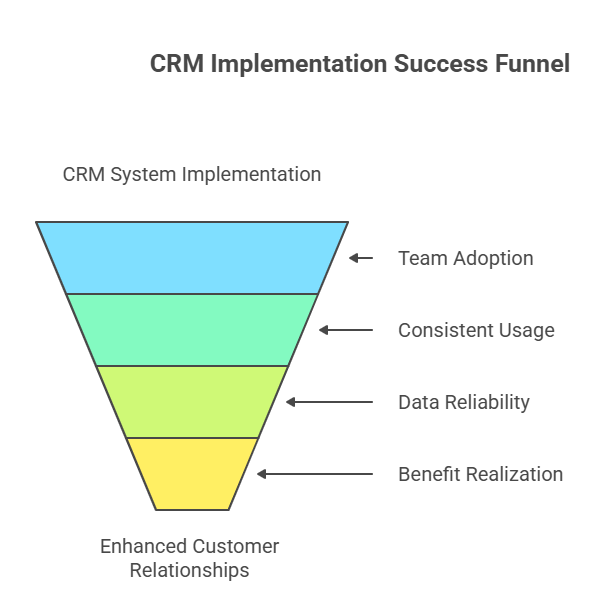
But these benefits only show up when the system is actually used. If your team avoids it or uses it inconsistently, even the best CRM becomes ineffective.
That is why the selection process matters so much.
1. Start with Your Business Needs
Before looking at any CRM platform, spend some time understanding your current situation.
Where are things breaking down?
Maybe leads are coming in but not being followed up on time. Maybe your sales team has no clear view of the pipeline. Or maybe different teams are working with different sets of data.
You do not need a perfect process mapped out. You just need clarity on what is not working.
Some businesses focus mainly on sales tracking, while others care more about customer support or long-term relationship management. Your priorities will shape your decision.
A simple exercise helps here. Write down the top three problems your team faces daily. That list will guide your CRM selection better than any feature comparison.
2. Ease of Use and User Adoption
This is one of the most important factors, yet it is often underestimated.
If your team finds the CRM difficult to use, they will avoid it. Not intentionally, but gradually. They will delay updates, skip entries, or use their own methods to track work.
That is when problems start:
- Data becomes unreliable
- Reports lose accuracy
- Managers lose visibility
Look for a system that feels simple from the beginning:
- Clean interface that does not overwhelm users
- Easy navigation with minimal steps
- Quick data entry without unnecessary fields
You can test this during demos. Imagine a new employee using the system for the first time. If it feels confusing, it probably is.
3. Customization and Flexibility
Every business has its own way of working. Even companies in the same industry can have very different processes.
A rigid CRM forces you to adapt to it. That rarely works well in the long run.
Instead, look for flexibility:
- Custom fields to match your data
- Workflow adjustments based on your process
- Dashboards that reflect your priorities
This is where working with a CRM Software Development Company becomes useful. Instead of trying to fit into a predefined system, you can build or customize a CRM that aligns with your business.
Flexibility is not just about comfort. It directly affects how efficiently your team can work.
4. Integration with Existing Tools
Your CRM is not the only system your business uses. You probably already have tools for email, marketing, accounting, and customer support.
If these systems do not connect with your CRM, it creates extra work:
- Entering the same data multiple times
- Dealing with inconsistent information
- Switching between platforms constantly
A CRM that integrates well reduces these issues. It creates a single source of truth for your data.
Before choosing a CRM, check how easily it connects with your existing tools. Not just whether integration exists, but how smoothly it works in practice.
5. Automation Capabilities
Automation can make a noticeable difference in daily operations.
It helps reduce repetitive tasks and ensures that important actions are not missed.
Common automation features include:
- Lead assignment to the right team member
- Follow-up reminders to keep deals moving
- Email triggers based on customer actions
- Task scheduling to organize workloads
But there is a balance to maintain. Too much automation can create noise. Too many alerts or unnecessary triggers can overwhelm your team.
Start with simple automation. Focus on tasks that are repeated every day. Once your team is comfortable, you can expand gradually.
6. Data Management and Accuracy
A CRM is only as useful as the data it holds.
If the data is outdated, duplicated, or incomplete, it affects everything:
- Sales forecasts become unreliable
- Customer interactions feel disconnected
- Decisions are based on guesswork
Look for features that support clean and accurate data:
- Duplicate detection
- Easy editing and updates
- Clear data structure
More importantly, think about usability. If it is easy for your team to update data, they will do it consistently. That is what keeps your CRM reliable over time.
7. Scalability for Future Growth
Your business will not stay the same. It will grow, change, and evolve.
Your CRM should be able to handle that growth without becoming a limitation.
Consider:
- Can it support more users without slowing down
- Can workflows become more advanced
- Can it handle larger volumes of data
Many companies work with a Custom Software Development Company in USA to build systems that are designed for long-term scalability.
Switching CRMs later can be expensive and disruptive, so it is better to think ahead now.
8. Cost vs Value
Cost is important, but it should not be the only factor.
A low-cost CRM may seem attractive, but it can create problems if it lacks essential features or slows down your team.
Instead, focus on value:
- Time saved through better organization
- Productivity gains from automation
- Revenue impact from improved sales processes
A CRM should justify its cost by improving how your business operates.
9. Support and Training
Even a well-designed CRM requires proper onboarding.
Without guidance, your team may struggle to use the system effectively.
Look for:
- Responsive support when issues arise
- Training resources for new users
- Clear documentation for everyday use
Good support makes a big difference, especially in the early stages of adoption.
10. Security and Compliance
Customer data is sensitive. Protecting it is essential.
Your CRM should include:
- Data encryption
- Role-based access control
- Secure authentication
Security is not just about avoiding risks. It also builds trust with your customers.
11. Mobile Accessibility
Work does not happen only at desks anymore.
Sales teams and managers often need access to information while traveling or working remotely.
A mobile-friendly CRM allows:
- Quick updates
- Real-time data access
- Faster response times
This keeps your team productive, no matter where they are.
12. Industry-Specific Requirements
Some businesses need more specialized features than others.
For example:
- Real estate businesses need property tracking
- Healthcare organizations need strict compliance
- E-commerce companies focus on customer journeys
In such cases, businesses often choose to Hire Microsoft Dynamics CRM Developer to customize advanced CRM platforms based on their specific needs.
Choosing a CRM that aligns with your industry reduces setup time and improves usability.
Key CRM Factors at a Glance
| Factor | Why It Matters |
| Ease of Use | Drives adoption and daily usage |
| Customization | Aligns CRM with your workflow |
| Integration | Connects tools and reduces manual work |
| Automation | Saves time and improves consistency |
| Data Quality | Supports accurate decisions |
| Scalability | Prepares your business for growth |
| Security | Protects customer information |
Final Thoughts
Choosing a CRM is not something you rush. It is a decision that affects how your team works every day.
The right CRM feels simple. Your team uses it without resistance. Information stays organized. Workflows become smoother.
The wrong CRM does the opposite. It creates friction, confusion, and extra effort.
Take your time. Focus on what your team actually needs, not what looks impressive in a demo.
Because in the end, the best CRM is not the one with the most features. It is the one your team trusts, uses consistently, and relies on to get their work done.